Array sites, arrays and RAID 6 / RAID 10

DS8000 RAID is what keeps your data safe when a flash drive dies. Every group of 8 drives in a DS8000 becomes a RAID array, and the RAID level you choose settles two things for years to come: how much space you get, and how many drives can fail before you lose data.

You built the whole ladder once in Lesson 9, and this time you zoom into the bottom two rungs, the array site and the array. You’ll see the four array shapes a DS8A00 can build, why some arrays get a spare while others don’t, and why IBM made RAID 6 the default and dropped RAID 5.

You’ll also work out the maths yourself with a small Python calculator, because “how much usable space do we get?” is the first thing any manager asks.

Phase 2 roadmap: 9 Virtualization → 10 RAID (you are here) → 11 Ranks and extents → 12 Extent pools → 13 FB and CKD volumes → 14 LSS and LCU → 15 Thin provisioning → 16 Easy Tier → 17 Volume groups.

TimeYou needBy the end you can
60 to 75 minutesPython 3 and the practice shell in C:\ds8k-lab (set up in Lesson 1)Explain 5+P+Q+S, 6+P+Q, 3+3+2S and 4+4, work out usable capacity for each, and build RAID 6 and RAID 10 arrays with mkarray

What it is, in one line

A DS8000 array is one array site of 8 identical drives, protected with RAID 6 (two parity drives, the default) or RAID 10 (mirrored pairs), and sometimes a few spare drives are held back.

In Simple Words

Eight friends sharing a homework secret

Eight friends are doing a big homework project together, and each of them keeps some of the pages in their bag. With the RAID 6 plan, six friends carry the real pages and the other two carry special “check notes”, so if any two friends lose their bags on the bus, the group can use the check notes to rewrite the missing pages.

Nothing is lost.

With the RAID 10 plan the friends pair up, and each pair carries two copies of the same pages. If one friend loses a bag, the partner still has everything and copying it back is quick, but now only half the bags hold different pages, so the group can carry less homework.

Sometimes one friend carries nothing at all and just waits at the gate. That’s the spare. When someone loses a bag, the spare steps in straight away and the group rebuilds the pages onto them.

So it comes down to a trade. RAID 6 carries more homework and can lose two bags, while RAID 10 carries less but recovers faster and answers questions quicker.

Engineer's View

Array types on the DS8A00

An array site is 8 identical drives (same capacity and drive class) that the system groups at install time across both enclosures of an HPFE Gen3 pair. An array is always built from exactly one array site, and each HPFE Gen3 pair holds up to six array sites.

Array typeDataProtectionSparesNotes
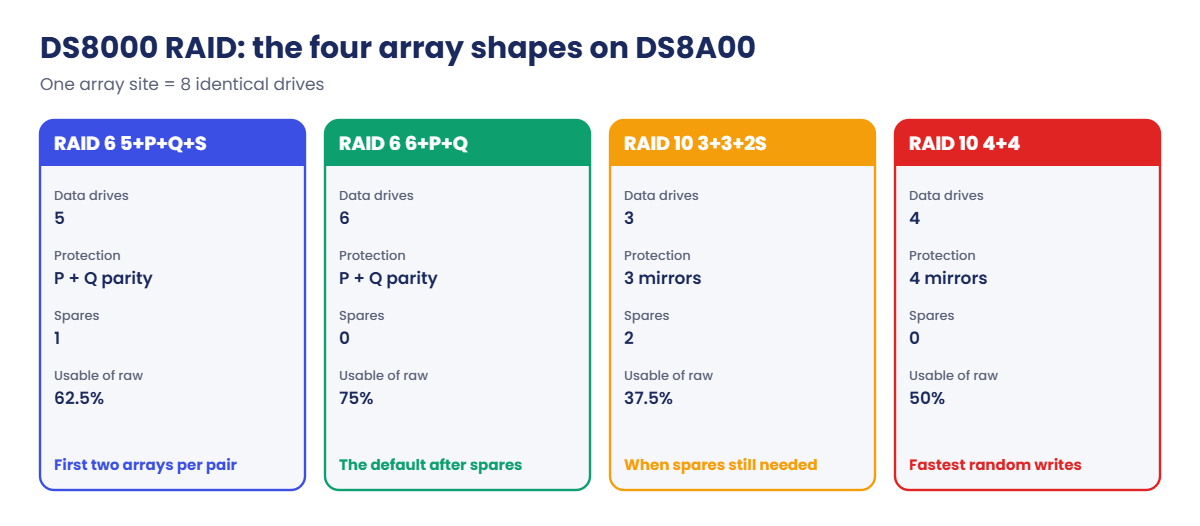
RAID 6 5+P+Q+S5 drives2 (P and Q parity)1The first two RAID 6 arrays in an HPFE pair
RAID 6 6+P+Q6 drives20Later RAID 6 arrays once the pair has its spares
RAID 10 3+3+2S3 drives3 mirror copies2When spares must still come from this site
RAID 10 4+44 drives4 mirror copies0When the spares already exist

Key rules from the Redbook:

  • RAID 6 is the default and the one IBM prefers. RAID 10 is an option for Flash Tier 1, Flash Tier 2 and FCM drives, and RAID 5 is no longer supported on DS8A00.
  • Each HPFE Gen3 pair keeps two global spares, taken from the first 16 drives, and those spares can serve any array on the same flash RAID adapter (DA) pair.
  • The spare rules: keep at least two spares per DA pair, and at least two for the largest drive size on that pair. Array sites keep giving up spares until both rules are met.
  • P and Q are capacity, not fixed drives. The parity rotates across all the members, so no drive ends up busier than the rest.
  • RAID 6 survives two drive failures, two media errors at the same time, or one of each, and IBM reckons that cuts the risk by around 1,000 times compared with RAID 5.
  • Write cost: before cache optimisations, a random host write can cause up to six back-end I/Os on RAID 6 (the RAID penalty) and two on RAID 10.
  • You can mix RAID levels inside one HPFE pair, but you can’t mix FCM drives with Flash Tier 1 or Tier 2 drives.

On DS8900F: you get the same RAID 6 default and the same spare idea on HPFE Gen2. Older DS8000 generations offered RAID 5, which is why it still shows up in old runbooks.

How it works, step by step

Picture an HPFE Gen3 pair arriving with its first 16 drives, and follow it from the moment the drives go in to the moment you have protected arrays.

1The system forms array sites

The 16 drives become two array sites of 8. You don’t choose the drives; the DS8000 picks them so each site has members in both enclosures and on both paths to the servers. At this point a site has no RAID and no server.

2You pick a RAID level with mkarray

mkarray -raidtype 6 -arsite S1 turns site S1 into an array, and the system decides by itself whether this array has to keep a spare. The first two arrays in the pair keep one spare each, and that’s where the pair’s two global spares come from.

That’s why the same command builds a 5+P+Q+S array the first time and a 6+P+Q array later on. You never type the shape; the spare rules pick it for you.

DS8000 RAID array types on DS8A00: 5+P+Q+S, 6+P+Q, 3+3+2S and 4+4

3Data and parity are striped across all members

On RAID 6, each stripe holds data blocks plus two parity blocks, P and Q, which are calculated in two independent ways. P and Q move to a different position in every stripe, so over many stripes each drive holds a fair share of data and parity and does a fair share of the work.

With two independent parities, the controller can work out any two missing blocks in a stripe, and that’s what sits behind “survives two failures”.

4RAID 10 mirrors instead of calculating

RAID 10 splits the drives into two halves. Data is striped across one half (RAID 0) and copied to the other (RAID 1), so a write needs only two back-end writes, one per copy, and a read can come from either copy.

What you pay is capacity, because half the drives hold copies. Take the spares out as well (3+3+2S) and only 3 of the 8 drives hold unique data.

5A drive fails and a spare takes over

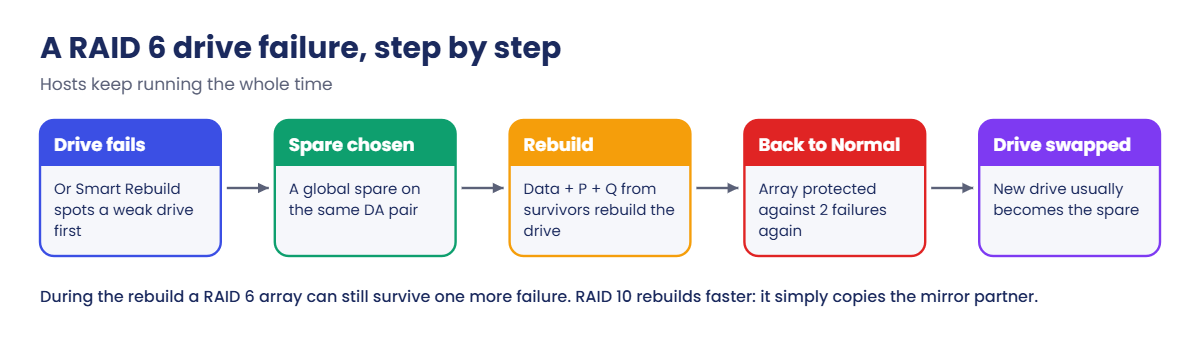
When a RAID 6 drive fails, the flash RAID adapter (DA) picks a spare and rebuilds the missing data onto it, reading the matching data and parity from the surviving drives in each stripe, recalculating, and writing the result to the spare. Hosts carry on reading and writing during the rebuild, perhaps a little slower than usual.

Even if a second drive fails during that rebuild, RAID 6 still has enough to recover. RAID 10 rebuilds faster because it only copies from the mirror partner, one read and one write per block.

6Smart Rebuild avoids most full rebuilds

Flash drives give warning signs before they die, and the DS8000 analyses drive errors every hour. Once a drive crosses an error threshold, Smart Rebuild copies it straight to a spare in a temporary RAID 1 pairing while it’s still working, so the array never drops to “one drive missing”.

Smart Rebuild also skips stripes that hold no volume data, which is why a half-empty array rebuilds faster.

RAID 6 drive failure and rebuild onto a global spare, step by step

7The failed drive becomes the new spare

The service engineer swaps the dead drive while everything keeps running, since the drives are hot-pluggable, and the new drive usually becomes a spare. Over time the DS8000 may shuffle spares around (spare rebalancing) to keep them spread across both enclosures and both paths.

So “the spare” isn’t a fixed slot but a role that moves from drive to drive, and that’s why lsarray shows the shape (5+P+Q+S) instead of telling you which drive is the spare.

Hands-on lab: build every DS8A00 array type

Before you run any command, double-check it

Read every command twice before you press Enter. Check the target: the system or account, the IDs, the names and the sizes. These commands are for learning and were tested in our lab, not on your system. At work, run the read-only list commands first, follow your change process, make sure a backup exists, and ask a second person to check anything that changes or deletes data. You run them at your own risk.

In the lab you’ll build all four array shapes, check the capacity maths and watch a rebuild. Open PowerShell in C:\ds8k-lab and start the practice shell with python ds8sim.py, and if this is all new, set it up first using Lesson 1.

Practice shell note: the practice shell is our own teaching tool, not IBM software. Real DS CLI output looks very close to this but isn’t identical. Messages starting with SIM, and the CMUN02014E message in the break lab, come from the practice shell, while the RAID 5 warning and error are the ones IBM shows in its Redbook.

1Start clean and read the array sites

Type these at the dscli> prompt:

simctl reset
lsarraysite -l

You should see this:

dscli> simctl reset
SIM0100I simctl: factory state restored (users and passwords kept; use simctl reset -all to reset them too).
dscli> lsarraysite -l
Date/Time: 24 October 2026 10:50:21 UTC IBM DSCLI Version: 7.10.10.348 DS: IBM.2107-78SV001
arsite DA Pair dkcap (10^9B) diskrpm State      Array diskclass       encrypt
===============================================================================
S1     0       4800.0        65000   Unassigned -     FlashCoreModule supported
S2     0       4800.0        65000   Unassigned -     FlashCoreModule supported
S3     0       4800.0        65000   Unassigned -     FlashCoreModule supported
S4     0       4800.0        65000   Unassigned -     FlashCoreModule supported
S5     2       4800.0        65000   Unassigned -     FlashCoreModule supported
S6     2       4800.0        65000   Unassigned -     FlashCoreModule supported
S7     2       3840.0        65000   Unassigned -     FlashTier2      supported
S8     2       3840.0        65000   Unassigned -     FlashTier2      supported

DA pair 0 has four sites of 4.8 TB FlashCore Modules (S1 to S4). DA pair 2 has two more FCM sites (S5, S6) plus two sites of 3.84 TB FlashTier2 drives (S7, S8), and because the spare rules work per DA pair and per drive size, DA pair 2 needs spares for both sizes.

✅ Checkpoint: You can say which DA pair and drive class each site has.

2Build all four array shapes

You’ll use two RAID 6 and two RAID 10 commands, and you’ll see the same -raidtype produce different shapes.

Type these at the dscli> prompt:

mkarray -raidtype 6 -arsite S1
mkarray -raidtype 6 -arsite S3
mkarray -raidtype 10 -arsite S7
mkarray -raidtype 10 -arsite S4
lsarray -l

You should see this:

dscli> mkarray -raidtype 6 -arsite S1
CMUC00004I mkarray: Array A0 successfully created.
dscli> mkarray -raidtype 6 -arsite S3
CMUC00004I mkarray: Array A1 successfully created.
dscli> mkarray -raidtype 10 -arsite S7
CMUC00004I mkarray: Array A2 successfully created.
dscli> mkarray -raidtype 10 -arsite S4
CMUC00004I mkarray: Array A3 successfully created.
dscli> lsarray -l
Date/Time: 24 October 2026 10:50:21 UTC IBM DSCLI Version: 7.10.10.348 DS: IBM.2107-78SV001
Array State      Data   RAIDtype    arsite Rank DA Pair DDMcap (10^9B) diskclass       encrypt
================================================================================================
A0    Unassigned Normal 6 (5+P+Q+S) S1     -    0       4800.0         FlashCoreModule supported
A1    Unassigned Normal 6 (6+P+Q)   S3     -    0       4800.0         FlashCoreModule supported
A2    Unassigned Normal 10 (3x2+2S) S7     -    2       3840.0         FlashTier2      supported
A3    Unassigned Normal 10 (4x2)    S4     -    0       4800.0         FlashCoreModule supported

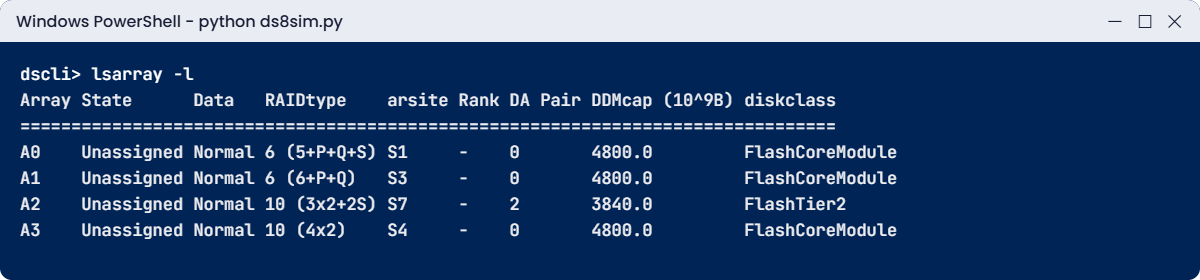
Look at the RAIDtype column. A0 on S1 kept a spare (5+P+Q+S), but A1 on S3 didn’t need one (6+P+Q).

A2 on S7 is RAID 10 with two spares, shown as 3x2+2S, which means three drives mirrored to three plus two spares, and A3 on S4 is a full 4x2 mirror with no spare.

In this lab system S1, S2 and the DA pair 2 sites are marked to keep spares, so the arrays on them hold some drives back. On a real DS8000 the system works this out from the order you build the arrays in and the spares that already exist.

Data Normal tells you every member drive is healthy, and State Unassigned tells you no rank is using the array yet.

✅ Checkpoint: lsarray -l shows all four shapes: 5+P+Q+S, 6+P+Q, 3×2+2S and 4×2.
Practice shell lsarray -l showing four DS8A00 array types
All four array shapes in one lsarray -l (output shortened).

3Work out the usable capacity with a script

Next, let a script read the four arrays you’ve built and work out their usable space. It asks the DS CLI for lsarray -l, picks up each RAIDtype and drive size, and does the sums.

Save it on your laptop as C:\ds8k-lab\raid_calc.py, next to ds8sim.py. It runs on the laptop, not on the DS8000.

A script can’t answer password prompts, so you need to save your password in a password file first. If security.dat and auto.profile are already in your lab folder from an earlier lesson, skip this part (the shell would only tell you the record already exists).

Run this (PowerShell, with your own password both times):

python ds8sim.py -hmc1 10.0.0.1 -user admin -passwd YourPassw0rd managepwfile -action add -name admin -pw YourPassw0rd -pwfile security.dat

You should see this:

CMUC00206I managepwfile: Record 10.0.0.1/admin successfully added to password file security.dat.

Then save these eight lines as auto.profile in the same folder. With banner: off, header: on and format: delim, every list comes back as one header row followed by comma-separated rows, which Python reads easily. Implementation Lesson 2 covers profiles in full.

auto.profile:

hmc1: 10.0.0.1
username: admin
pwfile: security.dat
devid: IBM.2107-78SV001
banner: off
header: on
format: delim
delim: ,

The script:

# raid_calc.py - usable capacity of every array on the DS8000, before formatting
# Runs on your workstation or jump server, not on the DS8000.
# It talks to the DS8000 only through the DS CLI (auto.profile: banner off, header on, format delim).
import csv, re, subprocess
DSCLI = ["python", "ds8sim.py", "-cfg", "auto.profile"]   # at work: ["dscli", "-cfg", "auto.profile"]

def dscli(*args):
    """Run one DS CLI command and return its rows as dictionaries."""
    out = subprocess.run(DSCLI + list(args), capture_output=True, text=True).stdout
    lines = [l for l in out.splitlines() if l and not l.startswith("SaatVedha") and not l.startswith("CMUC")]
    return list(csv.DictReader(lines))

TB, TiB = 10**12, 2**40
DRIVES = 8                                 # one DS8A00 array site = 8 drives
write_ios = {"6": 6, "10": 2}              # back-end I/Os per random host write (theory)

def shape(raidtype):
    """'6 (5+P+Q+S)' -> ('6', data 5, protect 2, spare 1); '10 (3x2+2S)' -> ('10', 3, 3, 2)"""
    level = raidtype.split()[0]
    data = int(re.search(r"\((\d+)", raidtype).group(1))
    s = re.search(r"\+(\d*)S\)", raidtype)
    spare = (int(s.group(1) or 1)) if s else 0
    return level, data, DRIVES - data - spare, spare

print(f"{'Array':<6}{'Site':<5}{'RAIDtype':<14}{'drive':>8}  data prot spare {'usable':>17}  of raw")
total = 0
for a in dscli("lsarray", "-l"):
    level, data, prot, spare = shape(a["RAIDtype"])
    drive_tb = float(a["DDMcap (10^9B)"]) / 1000
    usable = data * drive_tb * TB          # usable = data drives x drive size
    print(f"{a['Array']:<6}{a['arsite']:<5}{a['RAIDtype']:<14}{drive_tb:>5.2f} TB  {data:>4} {prot:>4} {spare:>5}"
          f" {usable/TB:>7.2f} TB {usable/TiB:>6.2f} TiB  {100*data/DRIVES:.1f}%")
    total += usable
print(f"Total usable before formatting: {total/TB:.2f} TB")
print()
for level, ios in write_ios.items():
    print(f"1,000 random host writes on RAID {level:<3} -> about {1000*ios:,} back-end I/Os")

Run this in a second PowerShell window in C:\ds8k-lab:

python raid_calc.py

You should see this:

Array Site RAIDtype         drive  data prot spare            usable  of raw
A0    S1   6 (5+P+Q+S)    4.80 TB     5    2     1   24.00 TB  21.83 TiB  62.5%
A1    S3   6 (6+P+Q)      4.80 TB     6    2     0   28.80 TB  26.19 TiB  75.0%
A2    S7   10 (3x2+2S)    3.84 TB     3    3     2   11.52 TB  10.48 TiB  37.5%
A3    S4   10 (4x2)       4.80 TB     4    4     0   19.20 TB  17.46 TiB  50.0%
Total usable before formatting: 83.52 TB

1,000 random host writes on RAID 6   -> about 6,000 back-end I/Os
1,000 random host writes on RAID 10  -> about 2,000 back-end I/Os

You can see the pattern straight away: A1, a 6+P+Q array, gives 75% of raw, and A3, a 4×2 RAID 10 array, gives 50%. On the same 8 drives of 4.8 TB, RAID 6 gives you 1.5 times the space of RAID 10, 28.80 TB against 19.20 TB.

Spares eat space too: A0 keeps one and drops to 62.5%, and A2 keeps two and drops to 37.5%.

The last two lines show the other side of the deal, where RAID 6 does about three times the back-end work for random writes. In practice the DS8000 cache soaks up a lot of that, so read these as theory rather than a promise.

These numbers also come before rank formatting and metadata, which you’ll meet in Lesson 11. At work you’d run the same script from the jump server with dscli once the arrays are built, and compare its total with the capacity the project paid for.

✅ Checkpoint: Your script shows 75.0% for A1 (6+P+Q) and 50.0% for A3 (4×2).

4Fail a drive and watch the rebuild

simctl drivefail is a practice shell command that fails one drive in a site, and simctl tick moves the shell’s clock forward 10 minutes.

Type these at the dscli> prompt:

simctl drivefail S3
lsarray
simctl tick
lsarray

You should see this:

dscli> simctl drivefail S3
SIM0110I simctl: drive IBM.2107-D04-8SV01/R1-P1-D17 failed. Array A1 is rebuilding onto a spare (about 10 simulated minutes; use simctl tick).
dscli> lsarray
Date/Time: 24 October 2026 10:50:21 UTC IBM DSCLI Version: 7.10.10.348 DS: IBM.2107-78SV001
Array State      Data       RAIDtype    arsite Rank DA Pair DDMcap (10^9B)
==========================================================================
A0    Unassigned Normal     6 (5+P+Q+S) S1     -    0       4800.0
A1    Unassigned Rebuilding 6 (6+P+Q)   S3     -    0       4800.0
A2    Unassigned Normal     10 (3x2+2S) S7     -    2       3840.0
A3    Unassigned Normal     10 (4x2)    S4     -    0       4800.0
dscli> simctl tick
SIM0111I simctl: array A1 rebuild complete; the failed drive was replaced and is now the spare.
SIM0112I simctl: clock advanced 10 minutes.
dscli> lsarray
Date/Time: 24 October 2026 11:00:22 UTC IBM DSCLI Version: 7.10.10.348 DS: IBM.2107-78SV001
Array State      Data   RAIDtype    arsite Rank DA Pair DDMcap (10^9B)
======================================================================
A0    Unassigned Normal 6 (5+P+Q+S) S1     -    0       4800.0
A1    Unassigned Normal 6 (6+P+Q)   S3     -    0       4800.0
A2    Unassigned Normal 10 (3x2+2S) S7     -    2       3840.0
A3    Unassigned Normal 10 (4x2)    S4     -    0       4800.0

A1 had no spare of its own, and yet it rebuilt, because it borrowed a global spare from the DA pair the way the Redbook describes. While Data showed Rebuilding, A1 kept serving I/O, and being RAID 6 it could have taken one more failure.

The shell’s 10 minutes is only for practice. On a real system the rebuild time depends on the drive size, how full the array is and how busy it is.

✅ Checkpoint: A1 goes from Rebuilding back to Normal.

Type quit when you’re done.

Break It, Then Fix It

Two classic mistakes here: asking for RAID 5 out of habit, and trying to reuse an array site. Keep the shell open from the lab.

1Break it: ask for RAID 5

An old runbook from a DS8870 says “create RAID 5 arrays”, so you follow it on site S2 and answer y to the warning.

Type this at the dscli> prompt:

mkarray -raidtype 5 -arsite S2

You’ll get this:

dscli> mkarray -raidtype 5 -arsite S2
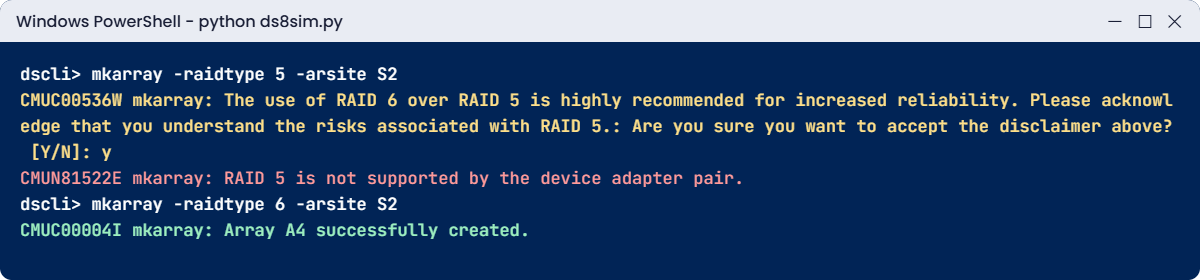
CMUC00536W mkarray: The use of RAID 6 over RAID 5 is highly recommended for increased reliability. Please acknowledge that you understand the risks associated with RAID 5.: Are you sure you want to accept the disclaimer above? [Y/N]: y
CMUN81522E mkarray: RAID 5 is not supported by the device adapter pair.
Practice shell: RAID 5 rejected with CMUN81522E, RAID 6 array created instead
RAID 5 is refused on DS8A00; RAID 6 works on the same site.

Why: the DS CLI still knows the word “RAID 5”, so it shows a warning first, and then the flash RAID adapters refuse because the DS8A00 supports only RAID 6 and RAID 10. Both messages match what IBM prints in its Redbook.

It comes down to drive size. Big flash drives take longer to rebuild, and with RAID 5 a second error during that window loses data, which is the gap RAID 6 closes.

Fix it:

mkarray -raidtype 6 -arsite S2
lsarray

You should see this:

dscli> mkarray -raidtype 6 -arsite S2
CMUC00004I mkarray: Array A4 successfully created.
dscli> lsarray
Date/Time: 24 October 2026 10:50:21 UTC IBM DSCLI Version: 7.10.10.348 DS: IBM.2107-78SV001
Array State      Data   RAIDtype    arsite Rank DA Pair DDMcap (10^9B)
======================================================================
A0    Unassigned Normal 6 (5+P+Q+S) S1     -    0       4800.0
A1    Unassigned Normal 6 (6+P+Q)   S3     -    0       4800.0
A2    Unassigned Normal 10 (3x2+2S) S7     -    2       3840.0
A3    Unassigned Normal 10 (4x2)    S4     -    0       4800.0
A4    Unassigned Normal 6 (5+P+Q+S) S2     -    0       4800.0

A4 comes out as RAID 6 with a spare, because S2 is one of the sites holding spares for DA pair 0. While you’re at it, update that old runbook.

✅ Checkpoint: A4 exists as 6 (5+P+Q+S) on S2.

2Break it: build a second array on the same site

A colleague wants “more RAID 6 capacity on S1” and tries to add another array to the same site.

Type this at the dscli> prompt:

mkarray -raidtype 6 -arsite S1

You’ll get this error:

dscli> mkarray -raidtype 6 -arsite S1
CMUN02014E mkarray: S1: The array site is already assigned to array A0. An array site can hold only one array.

Why: on every DS8000, one array site makes exactly one array and one array makes exactly one rank. You can’t split an array site like a pool of drives, so more capacity means more array sites, and that means more drives.

(This message text is from the practice shell.)

To fix it, list the sites and pick one that’s unassigned:

lsarraysite

You should see this:

dscli> lsarraysite
Date/Time: 24 October 2026 10:50:21 UTC IBM DSCLI Version: 7.10.10.348 DS: IBM.2107-78SV001
arsite DA Pair dkcap (10^9B) State      Array
=============================================
S1     0       4800.0        Assigned   A0
S2     0       4800.0        Assigned   A4
S3     0       4800.0        Assigned   A1
S4     0       4800.0        Assigned   A3
S5     2       4800.0        Unassigned -
S6     2       4800.0        Unassigned -
S7     2       3840.0        Assigned   A2
S8     2       3840.0        Unassigned -

S5, S6 and S8 are still unassigned. If none of them were free, the real fix wouldn’t be a command at all but an order for another HPFE pair or more drives.

✅ Checkpoint: You can name the three array sites that are still Unassigned.

This happened at work

The budget meeting that argued about the wrong number

A car-parts manufacturer was buying a DS8A50 for its ERP system and the plant floor databases, and finance had approved money for three HPFE Gen3 pairs. Two weeks before the order went in, the database team asked for “RAID 10 everywhere, because it’s faster”. The storage lead sat down with the numbers: on the same drives RAID 10 gave about two thirds of the usable space of RAID 6, so keeping the capacity the plants needed meant buying a fourth HPFE pair and more drives, a big extra cost nobody had planned for.

The meeting turned into an argument, with the DBAs talking about write latency and finance talking about the bill, and nobody had measured anything. What the team did: they pulled two weeks of I/O statistics from the old array and found the ERP workload was about 75% reads with a modest random write rate. Only one plant database, which logged sensor data every second, was genuinely write-heavy.

The decision: RAID 6 for nearly all the array sites, and RAID 10 for one array site pair used only by the sensor database’s busiest volumes. That kept them inside the budget, and after go-live the DS8000 cache absorbed most of the writes anyway.

Root cause of the argument: both sides were arguing from habit rather than data, and they were choosing one RAID level for the whole box instead of per workload.

Lesson: RAID 6 is the default for good reasons, the capacity and the double-failure protection. Use RAID 10 only where a measured random-write load justifies it, and remember you can mix both in one HPFE pair.

Common mistakes and troubleshooting

SymptomLikely causeWhat to check / fix
mkarray fails with RAID 5 not supportedOld runbook or habit from older DS8000 modelsDS8A00 supports only RAID 6 and RAID 10, so use -raidtype 6.
The first arrays give less space than later onesFirst arrays on a DA pair keep spares (5+P+Q+S or 3+3+2S)That’s normal. Read the RAIDtype column in lsarray -l and plan with both shapes in mind.
Capacity plan short by a thirdPlan assumed RAID 6 but arrays were built as RAID 10, or the reverseAgree the RAID level for each array site before build day, and run the calculator per site.
Someone wants to add drives to an existing arrayThinking an array can growAn array is always one site of 8 drives, so capacity grows by adding array sites.
Array shows Data RebuildingA drive failed or Smart Rebuild is copying a weak driveCheck lsarray and lsdrive -l. Let the rebuild finish, and make sure IBM has been called.
Write latency higher than expected on a few volumesHeavy random writes on RAID 6Measure first. If the problem is real, move those volumes to a RAID 10 pool rather than changing the whole box.
Order mixes FCM and Flash Tier 2 in one HPFE pairMixing drive types in one pairFCM can’t share an HPFE Gen3 pair with Flash Tier 1 or Tier 2 drives, so the order needs fixing.

Before any RAID discussion, get hold of the read/write ratio, the random write rate and the capacity needed in three years. Once you have those, the choice usually makes itself.

And don’t ever call a spare “wasted”. It’s the reason a drive failing at 3 a.m. turns into a ticket and not an outage.

Interview questions

Click a question to open it. Each one is worded the way an interviewer would ask it, and underneath you’ll find why they ask it and one way you could answer in your own words.

Fresher level

1. What’s the difference between RAID 6 and RAID 10 on a DS8000, in plain words?

Why they ask this: It’s the most common storage question for freshers, and they want to hear that you understand protection and capacity, not only the names.

How you might answer: RAID 6 stripes the data with two independent parities, so an array can survive any two drive failures, and on 8 drives you get 6 drives of space, or 5 if a spare is held back.

RAID 10 stripes the data and keeps a mirror copy, so you only get half the drives as space, but writes cost less and rebuilds finish sooner. On the DS8A00, RAID 6 is the default.

2. What does 5+P+Q+S mean when you see it in lsarray?

Why they ask this: They want to know you can read real output and not only the theory.

How you might answer: It’s a RAID 6 array on an 8-drive array site, with 5 drives’ worth of data, P and Q parity, and one spare drive. The parity doesn’t sit on fixed drives; it rotates across the seven members.

The first two RAID 6 arrays on an HPFE pair look like that because they supply the global spares, and the arrays after them are 6+P+Q.

2–5 years experience

3. The DBA team wants RAID 10 for everything. How do you respond?

Why they ask this: Real projects have this conversation all the time, and they want to see whether you can settle a design argument with data.

How you might answer: I’d ask for the workload numbers first, the read/write ratio and the random write rate. RAID 10 costs about a third of the capacity compared with 6+P+Q, and for most read-heavy work RAID 6 with the DS8000 cache is fine.

If one database really is write-heavy, I’d give it a RAID 10 array site and its own pool pair and keep RAID 6 everywhere else, since you can mix RAID levels inside an HPFE pair.

4. A drive fails in a RAID 6 array. Walk me through what happens and what you check.

Why they ask this: They want to see that you stay calm and know the order of events, Smart Rebuild included.

How you might answer: The DA picks a global spare and rebuilds the drive’s data from the data and parity on the other members, and the hosts keep running. If the drive had only been throwing errors, Smart Rebuild copies it to a spare first, so the array never loses redundancy.

I’d check lsarray for Data Rebuilding and lsdrive -l for the failed drive, confirm Call Home has opened a ticket with IBM, and keep an eye on performance until the rebuild ends. The replacement drive normally becomes the new spare.

Senior level

5. Why did IBM drop RAID 5 on the DS8A00? Was that the right call?

Why they ask this: A senior candidate should understand the risk model behind a default, not just repeat it.

How you might answer: Drives got a lot bigger, so rebuilds take longer, and with RAID 5 any second error during that window means data loss, which on large flash drives is a long window. RAID 6 adds a second independent parity, and IBM quotes around a thousand times lower risk than RAID 5.

For an enterprise array sitting behind banks and mainframes, I think it’s the right trade: you give up one more drive per array and get rid of a whole class of double-failure outages.

6. You’re planning 12 array sites of 4.8 TB FCM drives on two HPFE pairs. How do you estimate usable capacity for the business?

Why they ask this: They’re listening for layer-by-layer sizing and for whether you remember the spares.

How you might answer: I’d assume the first two arrays on each HPFE pair are 5+P+Q+S and the others 6+P+Q. With RAID 6 that’s 4 arrays with 5 data drives and 8 with 6, so 68 data drives, about 326 TB before formatting.

After that I’d take off rank formatting and pool metadata, leave headroom in the pools, and confirm with IBM’s sizing tool. FCM compression could add effective capacity on top, but I wouldn’t promise any of it until we’d measured the data.

Quick quiz

Q1. Which RAID levels can you create on a DS8A00?

  1. RAID 5 and RAID 6
  2. RAID 6 and RAID 10
  3. RAID 5, 6 and 10
  4. RAID 1 and RAID 10
Show answer

B: RAID 6 (the default) and RAID 10. RAID 5 is no longer supported.

Q2. How many data drives does a 6+P+Q array have?

  1. 5
  2. 6
  3. 7
  4. 8
Show answer

B: Six drives of data and two drives of parity capacity, with no spare.

Q3. Why are the first two RAID 6 arrays on an HPFE Gen3 pair 5+P+Q+S?

  1. They are slower
  2. They give the pair its two global spares
  3. RAID 6 always needs a spare
  4. The first drives are smaller
Show answer

B: Each HPFE Gen3 pair keeps two global spares from its first 16 drives, so the first two arrays hold one spare each.

Q4. On the same 8 drives, roughly how much more space does 6+P+Q give than 4+4 RAID 10?

  1. The same
  2. About 1.2 times
  3. About 1.5 times
  4. About 3 times
Show answer

C: 6 data drives against 4, so 75% of raw against 50%, which is 1.5 times.

Q5. What does Smart Rebuild do?

  1. Rebuilds the whole array every hour
  2. Copies a weak but still working drive to a spare before it fails
  3. Turns RAID 6 into RAID 10
  4. Deletes unused spares
Show answer

B: It pairs the suspect drive with a spare in a temporary RAID 1 and copies it across, so the array never loses redundancy.

Quick recap

  • An array is always one array site of 8 identical drives.
  • DS8A00 supports RAID 6 (the default) and RAID 10, and rejects RAID 5.
  • There are four shapes, 5+P+Q+S, 6+P+Q, 3+3+2S and 4+4, and the spare rules pick the shape for you.
  • Each HPFE Gen3 pair keeps two global spares, from the first 16 drives.
  • RAID 6 gives 62.5 to 75% of raw and survives two failures, while RAID 10 gives 37.5 to 50% with cheaper writes and faster rebuilds.
  • Smart Rebuild copies weak drives to a spare before they fail.
  • Pick the RAID level per workload using measured data, and mix levels only where it pays off.

Next lesson

Lesson 11: Ranks and extents (16 MiB vs 1 GiB) → You format arrays into ranks, compare small and large extents, and calculate how many extents a rank gives you.

Further reading: DS8000 RAID

Want to go deeper into DS8000 RAID? Sections 3.3 and 4.5 of IBM’s IBM Storage DS8A00 Architecture and Implementation Guide (IBM Redbooks) cover array types, spares and Smart Rebuild in detail. For the big picture of all the layers, revisit Lesson 9: DS8000 virtualization.

You can also see the full plan for this course on the IBM DS8000 Architecture course page.

Scroll to Top

This website uses cookies

We use a few cookies to keep this site working. If you allow it, we also use Google Analytics to count visits so we can improve our lessons. You can accept all, deny the optional ones, or choose what to allow.