

Before you run any command, double-check it
Read every command twice before you press Enter. Check the target: the system or account, the IDs, the names and the sizes. These commands are for learning and were tested in our lab, not on your system. At work, run the read-only list commands first, follow your change process, make sure a backup exists, and ask a second person to check anything that changes or deletes data. You run them at your own risk.
In this lab you map shared volumes to a two-node cluster and a private volume to one node, then read every object the DS8000 created along the way. Start in C:\ds8k-lab (shell setup is in Lesson 1).
Practice shell note: the practice shell is our own teaching tool, not IBM software, and real DS CLI output looks very close to this without being identical. The host, cluster and volume group messages match IBM’s Redbook, and CMUN02054E in the break lab is a practice shell message. Four host ports are already logged in to the lab DS8000, as if the SAN team had zoned them.
1Build pools and volumes with a setup script
Save this as C:\ds8k-lab\setup-17.txt, run simctl reset and quit in the shell, then run the script with -script and log in again.
mkarray -raidtype 6 -arsite S7
mkarray -raidtype 6 -arsite S8
mkrank -array A0 -keygrp 1 -stgtype fb
mkrank -array A1 -keygrp 1 -stgtype fb
mkextpool -rankgrp 0 -keygrp 1 -stgtype fb fb_0
mkextpool -rankgrp 1 -keygrp 1 -stgtype fb fb_1
chrank -extpool P0 R0
chrank -extpool P1 R1
mkfbvol -extpool P0 -cap 100 -name ehr_#h 2000-2001
mkfbvol -extpool P1 -cap 100 -name ehr_#h 2100-2101
mkfbvol -extpool P0 -cap 50 -name lab_#h 2200
You now have four 100 GiB EHR volumes spread over both servers (LSS 20 and 21) and one 50 GiB log volume in LSS 22.
✅ Checkpoint: The script ends with “FB volume 2200 successfully created”.
2See which host ports are waiting
Type this at the dscli> prompt:
lshostport -unknownYou should see this:
dscli> lshostport -unknown
Date/Time: 24 October 2026 14:01:26 UTC IBM DSCLI Version: 7.10.10.348 DS: IBM.2107-78SV001
WWNN             WWPN             ESSIOport
===========================================
20000024FF2D0F86 21000024FF2D0F86 I0032
20000024FF2D0F87 21000024FF2D0F87 I0042
20000120FA13B914 10000090FA13B914 I0032
20000120FA13B915 10000090FA13B915 I0042
Four WWPNs are logged in but not defined to any host, and ESSIOport is the DS8000 port each one reached. The server team tells you 10000090FA13B914 belongs to ehr_node1 and 10000090FA13B915 to ehr_node2, while the two 21000024... ports belong to a different server running Windows.
In real life each node would have at least two HBA ports on two fabrics, but the lab gives each node one port to keep the output short.
✅ Checkpoint: You can say which WWPN belongs to ehr_node1.
3Create the cluster and hosts, then map
Type these at the dscli> prompt:
mkcluster ehr_cluster
mkhost -type "Linux Server" -hostport 10000090FA13B914 -cluster ehr_cluster ehr_node1
mkhost -type "Linux Server" -hostport 10000090FA13B915 -cluster ehr_cluster ehr_node2
chcluster -action map -volume 2000-2001,2100-2101 ehr_cluster
chhost -action map -volume 2200 ehr_node1
You should see this:
dscli> mkcluster ehr_cluster
CMUC00538I mkcluster: The cluster ehr_cluster is successfully created.
dscli> mkhost -type "Linux Server" -hostport 10000090FA13B914 -cluster ehr_cluster ehr_node1
CMUC00530I mkhost: The host ehr_node1 is successfully created.
dscli> mkhost -type "Linux Server" -hostport 10000090FA13B915 -cluster ehr_cluster ehr_node2
CMUC00530I mkhost: The host ehr_node2 is successfully created.
dscli> chcluster -action map -volume 2000-2001,2100-2101 ehr_cluster
CMUC00541I chcluster: The cluster ehr_cluster is successfully modified.
dscli> chhost -action map -volume 2200 ehr_node1
CMUC00531I chhost: The host ehr_node1 is successfully modified.
Five success messages, and you never once typed “volume group”, yet the DS8000 is about to show you it made two of them anyway.
✅ Checkpoint: All five commands report “successfully”.
4Read the hidden volume groups
Type these at the dscli> prompt:
lsvolgrp
showvolgrp V0
showvolgrp V1
lshost -l
You should see this:
dscli> lsvolgrp
Date/Time: 24 October 2026 14:01:36 UTC IBM DSCLI Version: 7.10.10.348 DS: IBM.2107-78SV001
Name        ID Type
===========================
ehr_cluster V0 SCSI Map 256
ehr_node1   V1 SCSI Map 256
dscli> showvolgrp V0
Date/Time: 24 October 2026 14:01:36 UTC IBM DSCLI Version: 7.10.10.348 DS: IBM.2107-78SV001
Name ehr_cluster
ID   V0
Type SCSI Map 256
Vols 2000 2001 2100 2101
dscli> showvolgrp V1
Date/Time: 24 October 2026 14:01:36 UTC IBM DSCLI Version: 7.10.10.348 DS: IBM.2107-78SV001
Name ehr_node1
ID   V1
Type SCSI Map 256
Vols 2200
dscli> lshost -l
Date/Time: 24 October 2026 14:01:36 UTC IBM DSCLI Version: 7.10.10.348 DS: IBM.2107-78SV001
Name      Type         State  Cluster     AddrMode   Volumes Host ports I/O ports
=================================================================================
ehr_node1 Linux Server Online ehr_cluster scsimap256 5       1          16 (all)
ehr_node2 Linux Server Online ehr_cluster scsimap256 4       1          16 (all)
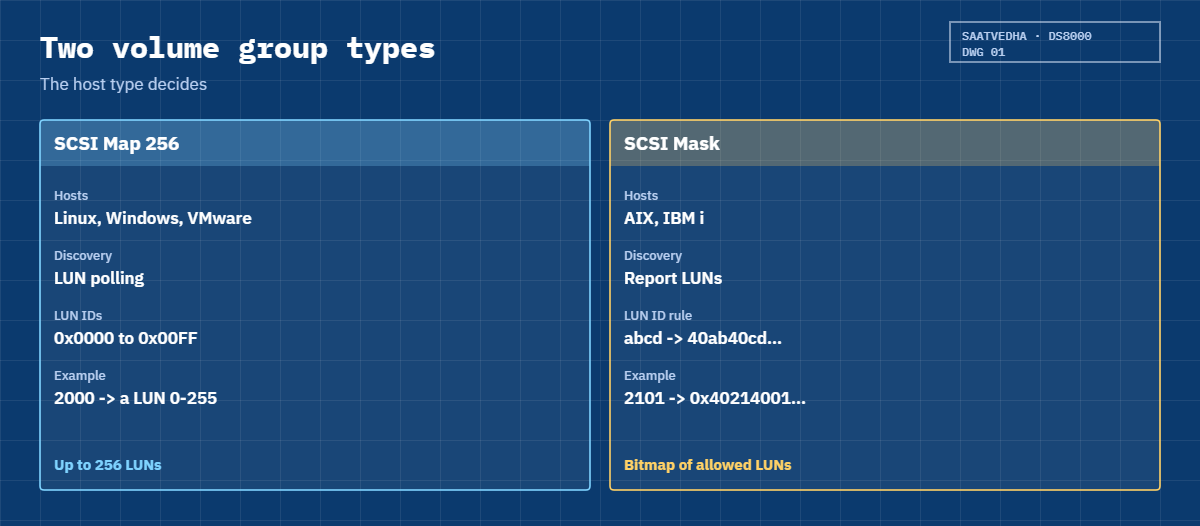
V0 is named after the cluster and holds the four shared volumes, and V1 is named after ehr_node1 and holds only its log volume. Both are SCSI Map 256, the type for Linux hosts that poll for LUNs.
lshost -l adds it all up: ehr_node1 sees 5 volumes (4 shared + 1 private) and ehr_node2 sees 4. State Online means the host port is logged in, and I/O ports 16 (all) means any DS8000 port is allowed, with zoning deciding which ones really get used.
✅ Checkpoint: ehr_node1 shows Volumes 5 and ehr_node2 shows Volumes 4.

5Look one level lower: host connections
Type this at the dscli> prompt:
lshostconnect -lYou should see this:
dscli> lshostconnect -l
Date/Time: 24 October 2026 14:01:36 UTC IBM DSCLI Version: 7.10.10.348 DS: IBM.2107-78SV001
Name      ID   WWPN             HostType LBS addrDiscovery Profile      portgrp volgrpID ESSIOport host
============================================================================================================
ehr_node1 0001 10000090FA13B914 Linux    512 LUNPolling    Linux Server 1       V1       all       ehr_node1
ehr_node2 0002 10000090FA13B915 Linux    512 LUNPolling    Linux Server 2       V0       all       ehr_node2
This is the older, lower-level view the Redbook still documents. Each WWPN is a host connection with an ID, a block size (LBS 512), an address discovery method (LUNPolling), a port group and one volgrpID. The host column ties it back to the host object, and each host gets its own port group, which IBM recommends over the default port group 0.
The shell shows one volume group per connection, so node 1’s connection points to V1 here. This output doesn’t show how a real DS8000 combines a host’s own mappings with its cluster mappings internally, so trust lshost for the full count.
✅ Checkpoint: Each WWPN has its own host connection ID.
6See how a volume ID becomes a LUN ID
For SCSI Mask volume groups (AIX, IBM i) the Redbook gives a simple rule, and this script asks the DS8000 which volumes sit in which volume group and then applies that rule to each one.
Save it as C:\ds8k-lab\lunid.py, next to ds8sim.py. It runs right there on your laptop, not on the DS8000.
The script:
# lunid.py - how a DS8000 volume ID becomes a SCSI LUN ID in a SCSI Mask volume group
# Runs on your workstation or jump server, not on the DS8000.
# It talks to the DS8000 only through the DS CLI (auto.profile: banner off, header on, format delim).
import csv, subprocess
DSCLI = ["python", "ds8sim.py", "-cfg", "auto.profile"]   # at work: ["dscli", "-cfg", "auto.profile"]

def dscli(*args):
    """Run one DS CLI command and return its rows as dictionaries."""
    out = subprocess.run(DSCLI + list(args), capture_output=True, text=True).stdout
    lines = [l for l in out.splitlines() if l and not l.startswith("SaatVedha") and not l.startswith("CMUC")]
    return list(csv.DictReader(lines))

def scsimask_lun(vol):
    ab, cd = vol[:2], vol[2:]
    return f"40{ab}40{cd}00000000"

names = {v["ID"]: v["Name"] for v in dscli("lsfbvol")}
for g in dscli("lsvolgrp"):
    vols = dscli("showvolgrp", g["ID"])[0]["Vols"].split()
    print(f"Volume group {g['ID']} {g['Name']} ({g['Type']}), {len(vols)} volume(s)")
    for vol in vols:
        print(f"  volume {vol} {names.get(vol, '-'):<9} -> LUN_ID 0x{scsimask_lun(vol)}")
print()
print("LUN_ID is the SCSI Mask rule (AIX, IBM i): 40 + first two digits + 40 + last two digits + zeros")
print("SCSI Map 256 volume group: up to 256 LUN IDs, 0x0000 to 0x00FF")
print("Limits: 8,320 volume groups, 8,192 host attachments")
The script needs a saved password and a profile it can read. Use the password you picked in Lesson 1, and if the shell says the record already exists you’ve saved it before, so carry on.
Type these at the dscli> prompt:
managepwfile -action add -name admin -pw <your password> -pwfile security.dat
quit
You should see this:
dscli> managepwfile -action add -name admin -pw <your password> -pwfile security.dat
CMUC00206I managepwfile: Record 10.0.0.1/admin successfully added to password file security.dat.
dscli> quit
Save this as auto.profile in the lab folder:
hmc1: 10.0.0.1
username: admin
pwfile: security.dat
devid: IBM.2107-78SV001
banner: off
header: on
format: delim
delim: ,
Banner off, header on and format delim make the DS CLI print one header row followed by plain comma-separated rows, which is easy for a script to read. Implementation Lesson 2 explains every line.
Run this:
python lunid.pyYou should see this:
Volume group V0 ehr_cluster (SCSI Map 256), 4 volume(s)
  volume 2000 ehr_2000  -> LUN_ID 0x4020400000000000
  volume 2001 ehr_2001  -> LUN_ID 0x4020400100000000
  volume 2100 ehr_2100  -> LUN_ID 0x4021400000000000
  volume 2101 ehr_2101  -> LUN_ID 0x4021400100000000
Volume group V1 ehr_node1 (SCSI Map 256), 1 volume(s)
  volume 2200 lab_2200  -> LUN_ID 0x4022400000000000

LUN_ID is the SCSI Mask rule (AIX, IBM i): 40 + first two digits + 40 + last two digits + zeros
SCSI Map 256 volume group: up to 256 LUN IDs, 0x0000 to 0x00FF
Limits: 8,320 volume groups, 8,192 host attachments
The script ran lsfbvol, lsvolgrp and one showvolgrp per group, so the list always matches what’s on the box. The lab groups are SCSI Map 256, so the LUN_ID column shows the ID each volume would get in a SCSI Mask group.
An AIX admin who sees LUN 0x4021400100000000 in lsattr output can read DS8000 volume 2101 straight out of it, which is handy when you’re matching host disks to DS8000 volumes during a migration or a problem call. At work you’d run this from the jump server before a migration and hand the list to the AIX team.
✅ Checkpoint: Your script lists both volume groups and maps 2101 to 0x4021400100000000.
The scariest volume group mistake doesn’t give you an error at all. Keep the shell from the lab open.
1Break it: put the wrong host in the cluster
A colleague defines a Windows test server, lab_app, by copying your last mkhost command, cluster flag included.
Type these at the dscli> prompt:
mkhost -type "Windows Server" -hostport 21000024FF2D0F86,21000024FF2D0F87 -cluster ehr_cluster lab_app
lshost -l
You’ll get this (no error):
dscli> mkhost -type "Windows Server" -hostport 21000024FF2D0F86,21000024FF2D0F87 -cluster ehr_cluster lab_app
CMUC00530I mkhost: The host lab_app is successfully created.
dscli> lshost -l
Date/Time: 24 October 2026 14:01:52 UTC IBM DSCLI Version: 7.10.10.348 DS: IBM.2107-78SV001
Name      Type           State  Cluster     AddrMode   Volumes Host ports I/O ports
===================================================================================
ehr_node1 Linux Server   Online ehr_cluster scsimap256 5       1          16 (all)
ehr_node2 Linux Server   Online ehr_cluster scsimap256 4       1          16 (all)
lab_app   Windows Server Online ehr_cluster scsimap256 4       2          16 (all)
So a test server now sees the four EHR database LUNs, and if someone on lab_app opens Disk Management and initialises a “new disk”, the patient database gets overwritten. The DS8000 did exactly what it was told; it was the guest list that was wrong.
To fix it, take the host out of the cluster and then remove the mappings it keeps:
chhost -unassign lab_app
lshost -l
chhost -action unmap -volume 2000-2001,2100-2101 lab_app
lshost -l
You should see this:
dscli> chhost -unassign lab_app
CMUC00531I chhost: The host lab_app is successfully modified.
dscli> lshost -l
Date/Time: 24 October 2026 14:01:52 UTC IBM DSCLI Version: 7.10.10.348 DS: IBM.2107-78SV001
Name      Type           State  Cluster     AddrMode   Volumes Host ports I/O ports
===================================================================================
ehr_node1 Linux Server   Online ehr_cluster scsimap256 5       1          16 (all)
ehr_node2 Linux Server   Online ehr_cluster scsimap256 4       1          16 (all)
lab_app   Windows Server Online -           scsimap256 4       2          16 (all)
dscli> chhost -action unmap -volume 2000-2001,2100-2101 lab_app
CMUC00531I chhost: The host lab_app is successfully modified.
dscli> lshost -l
Date/Time: 24 October 2026 14:01:52 UTC IBM DSCLI Version: 7.10.10.348 DS: IBM.2107-78SV001
Name      Type           State  Cluster     AddrMode   Volumes Host ports I/O ports
===================================================================================
ehr_node1 Linux Server   Online ehr_cluster scsimap256 5       1          16 (all)
ehr_node2 Linux Server   Online ehr_cluster scsimap256 4       1          16 (all)
lab_app   Windows Server Online -           scsimap256 0       2          16 (all)
Look at the middle output. After -unassign, lab_app has left the cluster but still shows Volumes 4, which is the Redbook behaviour: a host that leaves a cluster keeps the cluster’s mappings, and only the explicit unmap brings it down to 0. Plenty of people stop after the first command and think they’re safe.
✅ Checkpoint: lab_app shows Cluster – and Volumes 0.
2Break it: define the same WWPN twice
Someone wants to add a third EHR node and reuses node 1’s WWPN from an old spreadsheet.
Type this at the dscli> prompt:
mkhost -type "Linux Server" -hostport 10000090FA13B914 ehr_node3You’ll get this error:
dscli> mkhost -type "Linux Server" -hostport 10000090FA13B914 ehr_node3
CMUN02054E mkhost: 10000090FA13B914: The host port is already defined (host connection 0001). Each host port can be defined only once.
Why: the Redbook says each host’s HBA can only be defined once. A WWPN belongs to one physical port, so two hosts can’t both own it. (The message text comes from the practice shell.) This time the error saved you, because the “third node” was really node 1.
To fix it, check which ports exist and who owns them:
lshostport -lYou should see this:
dscli> lshostport -l
Date/Time: 24 October 2026 14:01:52 UTC IBM DSCLI Version: 7.10.10.348 DS: IBM.2107-78SV001
WWPN             Name      Type           State     Volumes AddrMode   I/O ports Host
==========================================================================================
10000090FA13B914 ehr_node1 Linux Server   logged_in 5       scsimap256 16 (all)  ehr_node1
10000090FA13B915 ehr_node2 Linux Server   logged_in 4       scsimap256 16 (all)  ehr_node2
21000024FF2D0F86 lab_app   Windows Server logged_in 0       scsimap256 16 (all)  lab_app
21000024FF2D0F87 lab_app   Windows Server logged_in 0       scsimap256 16 (all)  lab_app
Now you’ve got every port, its host and how many volumes it sees in one table. Get the new node’s real WWPNs from the server itself (or the SAN switch) rather than an old spreadsheet, and then define it.
✅ Checkpoint: You can see that 10000090FA13B914 already belongs to ehr_node1.