Copy Services map: FlashCopy, Metro Mirror, Global Mirror
-
Phase 0: Start here
-
Phase 1: The hardware
-
Phase 2: Virtualization
-
Phase 3: Resilience and data protection
-
Phase 4: Generations, models and rack layouts
-
Phase 5: Wrap-up
DS8000 Copy Services are the functions that copy your data, either inside one box or to a second box far away. They’re the reason a bank can back up a running database in a second and an airline can switch to another data centre after a fire.
Lesson 18 showed you how the DS8000 survives a broken part, and Copy Services protect you from bigger problems like a lost site, a bad upgrade or a deleted table. There are five main tools, and the hard part isn’t the commands but choosing the right tool for each question, so this lesson gives you the map. In the lab you make a FlashCopy, build a Metro Mirror pair to a second practice DS8000 and watch the mirror suspend and recover, and the full hands-on setup comes later in the Implementation course.
| Time | You need | By the end you can |
|---|---|---|
| 60 to 75 minutes | The practice shell from Lesson 1 in C:\ds8k-lab (or ~/ds8k-lab) | Pick the right Copy Services function for a need, explain synchronous vs asynchronous, and read lsflash, lspprcpath and lspprc output |
What it is, in one line
DS8000 Copy Services make point-in-time copies inside the box (FlashCopy, Safeguarded Copy) and live copies to another DS8000 (Metro Mirror, Global Copy, Global Mirror).
In Simple Words
Photocopies and a pen pal
Your class keeps one big attendance register, and the teacher worries about two things. The first is that someone might spill ink on today’s page, so every morning she photocopies it, and the fast copy machine gives her the register exactly as it stood at 9 a.m.
That is FlashCopy.
The second worry is the whole school flooding, because a photocopy in the same cupboard would be lost too, so she asks a teacher at another school to keep a second register. If that school is next door, she can walk over after every new name and wait until her friend has written it too, which keeps both registers identical, and that’s Metro Mirror.
If the other school is in another city, waiting after every name is far too slow, so she posts the changes every few seconds instead. Her friend’s register runs a little behind but it’s never a half-written mess, and that’s Global Mirror.
Last of all, she locks a few extra photocopies in a safe nobody can open or change, so even if a naughty student scribbles on every register she still has a clean copy. That’s Safeguarded Copy.
Engineer's View
The five functions and the rules behind them
- FlashCopy makes a point-in-time copy of a volume on the same DS8000, almost instantly. With background copy (
-cp, the default) every track gets copied over time, while with-nocponly tracks that change on the source are copied, so the target still depends on the source. One source can have up to 12 FlashCopy relationships, only one of which can be the type 1 incremental kind (-record), and targets can be sources themselves (cascaded FlashCopy). - Metro Mirror (MM) is synchronous remote copy. The host write only completes once the secondary DS8000 has it, so you lose no data, but every write pays for the distance, which is why it’s meant for metro distances.
- Global Copy (GC) is asynchronous. Changes go across in the background so distance doesn’t slow the host, but the target isn’t consistent while it runs, and it’s used for data moves and as a building block.
- Global Mirror (GM) adds consistency to Global Copy by regularly forming consistency groups and keeping a consistent copy with a FlashCopy journal on the secondary site. The Redbook says an RPO of 2 seconds is possible with long-distance replication.
- Metro/Global Mirror (MGM) cascades the two for three sites, and Multiple-Target PPRC sends one primary to two remote sites at the same time.
- Safeguarded Copy is built on FlashCopy and keeps hidden backups that can’t be changed. Since Release 10.1 you can have up to 1,024 of them, and you’ll meet it properly in Lesson 21.
A few rules you’ll run into at work: Copy Services work on FB volumes up to 4 TiB, remote copy paths use FCP ports (never FICON), and the Redbook advises separate paths for MM and GC. Many actions, a freeze for example, work per LSS, so plan your LSSs by application.
All of it needs the Copy Services (CS) licence, which also covers IBM Copy Services Manager (CSM) on the HMC.
On DS8900F: you get the same functions and the same DS CLI commands, and you can mirror between a DS8900F and a DS8A00, which is how a lot of migrations get done.
How it works, step by step
The quickest way to choose between DS8000 Copy Services is to ask yourself two questions. Does the copy need to live in the same box or at another site, and may it be a fixed moment in time or does it have to be always up to date?
1FlashCopy: a picture of one moment
When you run mkflash 2000:2001 the DS8000 doesn’t copy 100 GiB straight away. It builds a bitmap of which tracks belong to the moment of the copy, and the target is usable immediately.
If a host later changes a track on the source, the old track gets saved to the target first, so anyone reading the target always sees the old picture. With background copy the rest is copied quietly as well, until the target becomes a full, independent volume.
You’d typically use it for a backup that takes seconds, a test copy for the dev team or a safety copy before an upgrade.
2Remote copy starts with paths
Before any mirror can exist, the two boxes need logical paths between an LSS on each side, called PPRC paths, which run over FCP ports through the SAN or over long-distance links like DWDM.
You check which ports can see each other with lsavailpprcport and then create the paths with mkpprcpath. Always use at least two, on different ports and ideally on different fabrics.
3Metro Mirror: wait for the far side
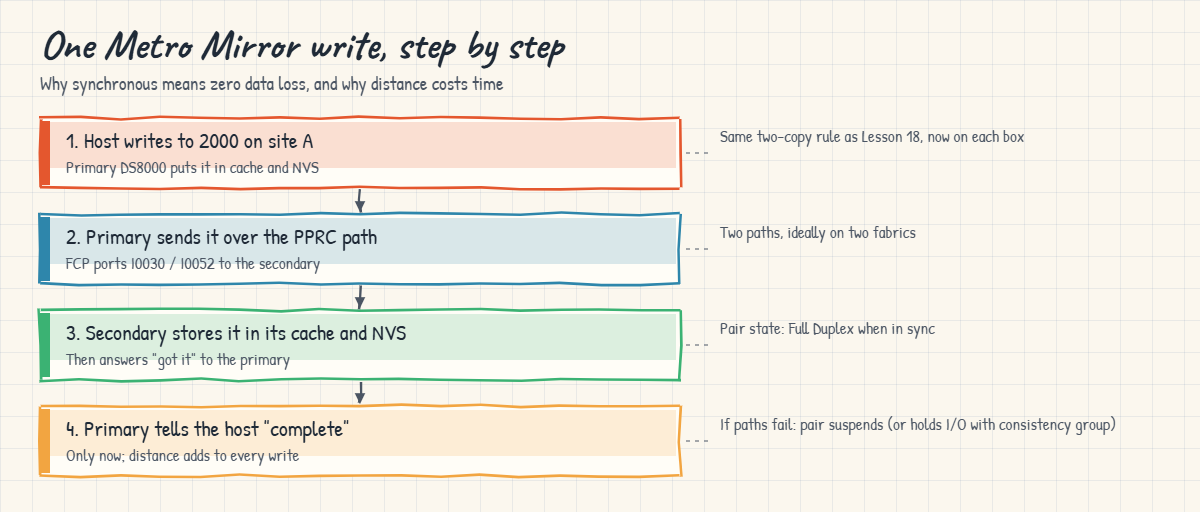
A host write goes into the primary’s cache and NVS and then over a path to the secondary, which stores it in its own cache and NVS, and only when the secondary answers does the host hear “complete”.
That’s how Metro Mirror gets zero data loss, and it’s also why it’s only used over short distances, since every write waits for the round trip.
4Global Copy and Global Mirror: do not wait
With Global Copy the host gets “complete” as soon as the primary has the write, and the changed tracks travel over later, so the secondary is never a clean point in time on its own.
Global Mirror fixes that. At a regular interval you set (the consistency group interval) it pauses briefly, makes sure a consistent set of changes has arrived and saves that set with FlashCopy on the remote site, so if site A is lost you recover to the last consistent group and lose a few seconds of data rather than hours.
5What happens when the link breaks
If every path for a Metro Mirror pair fails, the pair suspends and the primary keeps track of which tracks changed. Once the links are back, resumepprc sends only those changes.
Two options decide what the host sees in the meantime. With a consistency group path (-consistgrp) the volumes go long-busy so a planned freeze can keep all the LSSs consistent, and with -critmode writes fail rather than carry on without a mirror.
Most shops leave this to automation (CSM, GDPS).
So who drives DS8000 Copy Services day to day? For a single pair the DS CLI is fine, and you’ll use it in the Implementation course. For real DR with dozens of LSSs you’d use IBM Copy Services Manager, which now runs on the HMC and comes with the CS licence, or GDPS on IBM Z, and they run freezes, failovers and test copies the same way every time.
One planning point people often miss is licensing. The CS licence counts the capacity of volumes in Copy Services relationships, and with FlashCopy you count source and target, so a 10 TB Metro Mirror source with a FlashCopy on the DR side needs 10 TB of CS licence on site A and 20 TB on site B.
And remember that every function here is a copy, not a substitute for judgement. A mirror copies your mistakes as well, so if someone deletes a table, Metro Mirror deletes it on site B within milliseconds, and that’s the gap FlashCopy and Safeguarded Copy fill.
Hands-on lab: a FlashCopy and a Metro Mirror pair
Before you run any command, double-check it
Read every command twice before you press Enter. Check the target: the system or account, the IDs, the names and the sizes. These commands are for learning and were tested in our lab, not on your system. At work, run the read-only list commands first, follow your change process, make sure a backup exists, and ask a second person to check anything that changes or deletes data. You run them at your own risk.
You’ll get your hands on the two big families of DS8000 Copy Services, a FlashCopy inside the lab DS8A50 and a Metro Mirror pair to a second practice system, IBM.2107-78SV002 (name ds8k-g10-dr). Focus on what each output tells you rather than memorising flags.
Practice shell note: the practice shell is our own teaching tool, not IBM software, and real DS CLI output is similar but not identical. The second DS8000 is pretend, copies finish after 1 to 2 simulated minutes, and simctl lines (SIMxxxxI) are practice shell controls. Some CMU message IDs are ours, and the practice shell page lists them.
1Build both boxes with a setup script
Save these lines as setup-19.txt in your lab folder. The last line uses -dev to create the DR volume on the second box.
simctl reset
mkarray -raidtype 6 -arsite S1
mkarray -raidtype 6 -arsite S2
mkrank -array A0 -keygrp 1 -stgtype fb
mkrank -array A1 -keygrp 1 -stgtype fb
mkextpool -rankgrp 0 -keygrp 1 -stgtype fb FB_0
mkextpool -rankgrp 1 -keygrp 1 -stgtype fb FB_1
chrank -extpool P0 R0
chrank -extpool P1 R1
mkfbvol -extpool P0 -cap 100 -sam ese -name sales_db 2000
mkfbvol -extpool P0 -cap 100 -sam ese -name sales_snap 2001
mkfbvol -dev IBM.2107-78SV002 -extpool P0 -cap 100 -sam ese -name sales_dr 2000Run this (use your own password):
cd C:\ds8k-lab
python ds8sim.py -hmc1 10.0.0.1 -user admin -passwd YourPassw0rd -script setup-19.txtYou should see this:
SaatVedha DS8000 practice shell — not IBM software. Real DS CLI output looks like this but is not identical.
SIM0100I simctl: factory state restored (users and passwords kept; use simctl reset -all to reset them too).
CMUC00004I mkarray: Array A0 successfully created.
CMUC00004I mkarray: Array A1 successfully created.
CMUC00007I mkrank: Rank R0 successfully created.
CMUC00007I mkrank: Rank R1 successfully created.
CMUC00000I mkextpool: Extent pool P0 successfully created.
CMUC00000I mkextpool: Extent pool P1 successfully created.
CMUC00008I chrank: Rank R0 successfully modified.
CMUC00008I chrank: Rank R1 successfully modified.
CMUC00025I mkfbvol: FB volume 2000 successfully created.
CMUC00025I mkfbvol: FB volume 2001 successfully created.
CMUC00025I mkfbvol: FB volume 2000 successfully created.✅ Checkpoint: You have volumes 2000 and 2001 on the lab box and volume 2000 on the DR box.
2Take a FlashCopy
Start the shell with python ds8sim.py, log in, and make a no-copy FlashCopy of the sales database onto the snapshot volume.
Type these:
mkflash -nocp 2000:2001
lsflash 2000You should see this:
dscli> mkflash -nocp 2000:2001
CMUC00137I mkflash: FlashCopy pair 2000:2001 successfully created.
dscli> lsflash 2000
Date/Time: 24 October 2026 10:55:35 UTC IBM DSCLI Version: 7.10.10.348 DS: IBM.2107-78SV001
ID SrcLSS SequenceNum Timeout ActiveCopy Recording Persistent Revertible SourceWriteEnabled TargetWriteEnabled BackgroundCopy
====================================================================================================================================
2000:2001 20 0 120 Disabled Disabled Disabled Disabled Enabled Enabled DisabledThe pair exists as soon as the command returns. BackgroundCopy Disabled is your -nocp choice, so only changed tracks will ever be copied. Persistent Disabled means the relationship ends on its own after a full copy, and Recording Disabled means it isn’t incremental, so you can’t refresh it later with resyncflash.
✅ Checkpoint: lsflash shows 2000:2001 with BackgroundCopy Disabled.
3Find and build the replication paths
Remote copy needs the remote WWNN, and our DR box has WWNN 5005076303FFF1DD. Check which ports can reach it for LSS 20, then make both paths in a single command.
Type these:
lsavailpprcport -remotewwnn 5005076303FFF1DD -remotedev IBM.2107-78SV002 20:20
mkpprcpath -remotedev IBM.2107-78SV002 -remotewwnn 5005076303FFF1DD -srclss 20 -tgtlss 20 -consistgrp I0030:I0130 I0052:I0152
lspprcpath 20You should see this:
dscli> lsavailpprcport -remotewwnn 5005076303FFF1DD -remotedev IBM.2107-78SV002 20:20
Date/Time: 24 October 2026 10:55:35 UTC IBM DSCLI Version: 7.10.10.348 DS: IBM.2107-78SV001
Local Port Attached Port Type
=============================
I0030 I0130 FCP
I0052 I0152 FCP
dscli> mkpprcpath -remotedev IBM.2107-78SV002 -remotewwnn 5005076303FFF1DD -srclss 20 -tgtlss 20 -consistgrp I0030:I0130 I0052:I0152
CMUC00149I mkpprcpath: Remote Mirror and Copy path 20:20 successfully established.
dscli> lspprcpath 20
Date/Time: 24 October 2026 10:55:35 UTC IBM DSCLI Version: 7.10.10.348 DS: IBM.2107-78SV001
Src Tgt State SS Port Attached Port Tgt WWNN
=========================================================
20 20 Success FF20 I0030 I0130 5005076303FFF1DD
20 20 Success FF20 I0052 I0152 5005076303FFF1DDTwo local ports, I0030 and I0052, each reach a port on the DR box, and both paths show Success. Always list every port pair in one mkpprcpath command, because running it again with just one pair replaces the paths you already had.
✅ Checkpoint: lspprcpath 20 shows two paths in state Success.
4Create the Metro Mirror pair and watch it sync
Type these:
mkpprc -remotedev IBM.2107-78SV002 -type mmir -mode full 2000:2000
lspprc 2000
simctl tick 2
lspprc 2000You should see this:
dscli> mkpprc -remotedev IBM.2107-78SV002 -type mmir -mode full 2000:2000
CMUC00153I mkpprc: Remote Mirror and Copy volume pair relationship 2000:2000 successfully created.
dscli> lspprc 2000
Date/Time: 24 October 2026 10:55:35 UTC IBM DSCLI Version: 7.10.10.348 DS: IBM.2107-78SV001
ID State Reason Type SourceLSS Timeout (secs) Critical Mode First Pass Status
===================================================================================================
2000:2000 Copy Pending - Metro Mirror 20 60 Disabled Invalid
dscli> simctl tick 2
SIM0112I simctl: clock advanced 2 minutes.
dscli> lspprc 2000
Date/Time: 24 October 2026 10:57:35 UTC IBM DSCLI Version: 7.10.10.348 DS: IBM.2107-78SV001
ID State Reason Type SourceLSS Timeout (secs) Critical Mode First Pass Status
==================================================================================================
2000:2000 Full Duplex - Metro Mirror 20 60 Disabled InvalidCopy Pending means the first full copy is still running. Once it finishes the pair is Full Duplex, and every new write now reaches both boxes before the host hears “done”. On a real system that first copy can take hours for big volumes.
✅ Checkpoint: The pair moves from Copy Pending to Full Duplex.
5Look from the other side
Type this:
lspprc -dev IBM.2107-78SV002 2000You should see this:
dscli> lspprc -dev IBM.2107-78SV002 2000
Date/Time: 24 October 2026 10:57:35 UTC IBM DSCLI Version: 7.10.10.348 DS: IBM.2107-78SV002
ID State Reason Type SourceLSS Timeout (secs) Critical Mode First Pass Status
=========================================================================================================
2000:2000 Target Full Duplex - Metro Mirror 20 60 Disabled InvalidOn the secondary the same pair shows Target Full Duplex, so when someone sends you a screenshot during an incident, the word “Target” tells you which box you’re looking at. Type quit when you’re done but keep the state, because the break lab uses it.
✅ Checkpoint: The DR box reports Target Full Duplex.

Break It, Then Fix It
Here are two errors every DS8000 Copy Services admin runs into sooner or later. Start the shell again; your pair from the lab is still there.
1Break it: give the local WWNN instead of the remote one
It’s late, you copy the WWNN from the wrong lssi window, and you end up asking for paths to your own box.
Type this:
lsavailpprcport -remotewwnn 5005076303FFF0DD -remotedev IBM.2107-78SV002 20:20You’ll get this error:
dscli> lsavailpprcport -remotewwnn 5005076303FFF0DD -remotedev IBM.2107-78SV002 20:20
CMUN03004E lsavailpprcport: 5005076303FFF0DD: This is the WWNN of the local storage image. Specify the WWNN of the remote storage image (run lssi on the remote box).Why: -remotewwnn has to name the other system, and 5005076303FFF0DD is the lab box itself. This exact message comes from the practice shell, but a real DS8000 fails as well, because IBM’s documentation is clear that the WWNN must come from the remote box.
To fix it, ask the remote box for its WWNN and run the command again with that value (you saw it work in lab step 3).
Type this:
lssi -dev IBM.2107-78SV002You should see this:
dscli> lssi -dev IBM.2107-78SV002
Date/Time: 24 October 2026 10:57:39 UTC IBM DSCLI Version: 7.10.10.348 DS: IBM.2107-78SV002
Name ID Storage Unit Model WWNN State ESSNet
===================================================================================
ds8k-g10-dr IBM.2107-78SV002 IBM.2107-78SV002 A05 5005076303FFF1DD Online Enabled✅ Checkpoint: You can read the remote WWNN 5005076303FFF1DD from lssi on the DR box.
2Break it: cut both replication links
A contractor digs through the fibre between the sites and both links go dark.
Type these:
simctl linkfail I0030
simctl linkfail I0052
lspprcpath 20
lspprc 2000You’ll get this:
dscli> simctl linkfail I0030
SIM0113I simctl: replication link I0030 <-> I0130 is down.
dscli> simctl linkfail I0052
SIM0113I simctl: replication link I0052 <-> I0152 is down.
dscli> lspprcpath 20
Date/Time: 24 October 2026 10:57:39 UTC IBM DSCLI Version: 7.10.10.348 DS: IBM.2107-78SV001
Src Tgt State SS Port Attached Port Tgt WWNN
========================================================
20 20 Failed FF20 I0030 I0130 5005076303FFF1DD
20 20 Failed FF20 I0052 I0152 5005076303FFF1DD
dscli> lspprc 2000
Date/Time: 24 October 2026 10:57:39 UTC IBM DSCLI Version: 7.10.10.348 DS: IBM.2107-78SV001
ID State Reason Type SourceLSS Timeout (secs) Critical Mode First Pass Status
==================================================================================================================
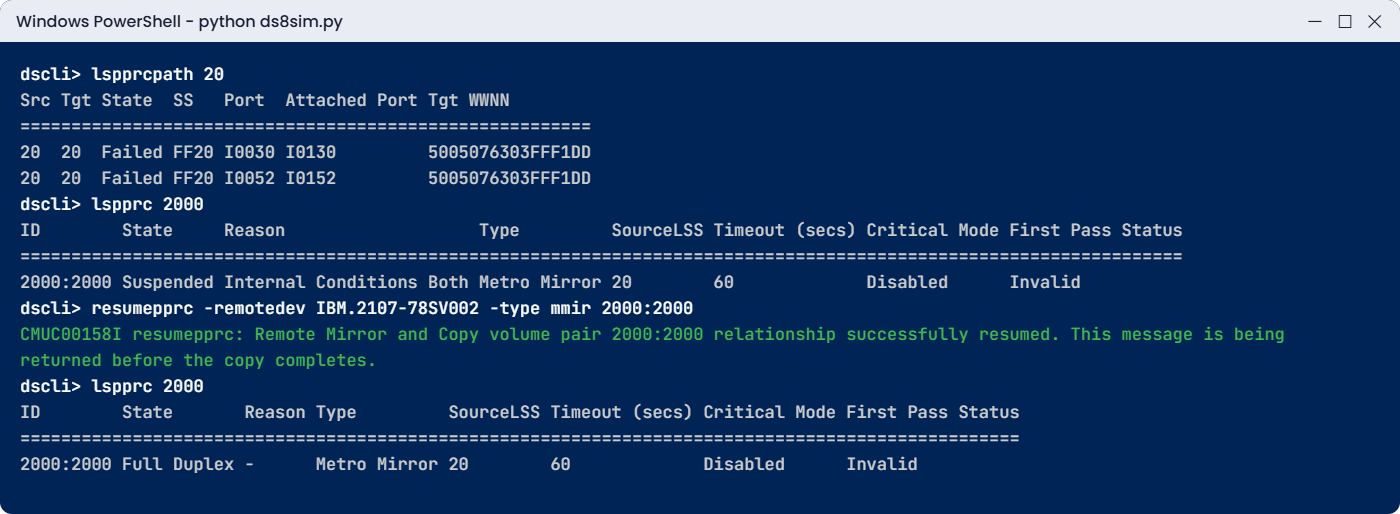
2000:2000 Suspended Internal Conditions Both Metro Mirror 20 60 Disabled InvalidWhy: with no working path the primary can’t send writes to the secondary, so the pair suspends. The host keeps writing on site A and the DS8000 remembers which tracks changed, but site B is getting older by the second, and if site A burned down now you’d lose everything written since the suspend.
To fix it, bring the links back, check the paths and resume. Notice the pair doesn’t resume by itself here, so someone (you, CSM or GDPS) has to act.
Type these:
simctl linkfix I0030
simctl linkfix I0052
lspprcpath 20
lspprc 2000
resumepprc -remotedev IBM.2107-78SV002 -type mmir 2000:2000
simctl tick 2
lspprc 2000You should see this:
dscli> simctl linkfix I0030
SIM0113I simctl: replication link I0030 <-> I0130 is up.
dscli> simctl linkfix I0052
SIM0113I simctl: replication link I0052 <-> I0152 is up.
dscli> lspprcpath 20
Date/Time: 24 October 2026 10:57:39 UTC IBM DSCLI Version: 7.10.10.348 DS: IBM.2107-78SV001
Src Tgt State SS Port Attached Port Tgt WWNN
=========================================================
20 20 Success FF20 I0030 I0130 5005076303FFF1DD
20 20 Success FF20 I0052 I0152 5005076303FFF1DD
dscli> lspprc 2000
Date/Time: 24 October 2026 10:57:39 UTC IBM DSCLI Version: 7.10.10.348 DS: IBM.2107-78SV001
ID State Reason Type SourceLSS Timeout (secs) Critical Mode First Pass Status
==================================================================================================================
2000:2000 Suspended Internal Conditions Both Metro Mirror 20 60 Disabled Invalid
dscli> resumepprc -remotedev IBM.2107-78SV002 -type mmir 2000:2000
CMUC00158I resumepprc: Remote Mirror and Copy volume pair 2000:2000 relationship successfully resumed. This message is being returned before the copy completes.
dscli> simctl tick 2
SIM0112I simctl: clock advanced 2 minutes.
dscli> lspprc 2000
Date/Time: 24 October 2026 10:59:39 UTC IBM DSCLI Version: 7.10.10.348 DS: IBM.2107-78SV001
ID State Reason Type SourceLSS Timeout (secs) Critical Mode First Pass Status
==================================================================================================
2000:2000 Full Duplex - Metro Mirror 20 60 Disabled Invalid
✅ Checkpoint: lspprc 2000 shows Full Duplex again after resumepprc.
This happened at work
The backup that was not a backup
An insurance company ran its claims database on a DS8000, and to speed up the nightly backups a new storage admin set up a FlashCopy to a target volume every evening and pointed the backup server at the target. His ticket said “daily FlashCopy backup in place”. To save capacity he’d used -nocp, which meant the target only held tracks that changed after 8 p.m. and everything else was still read from the source. The backup software wrote tapes from the target, and that worked fine for as long as the source stayed healthy.
Months later a pool expansion went badly and the source volume had to be restored. The team reached for “last night’s FlashCopy” and found it was useless on its own, because most of its tracks still pointed at the source they’d just lost. They restored from tape instead, which took fourteen hours, and the claims portal was down for most of a working day.
The root cause wasn’t a bad command but a misunderstanding of DS8000 Copy Services, because a no-copy FlashCopy is a point-in-time view that depends on the source, not a separate backup. What fixed it was a policy: FlashCopy targets used for recovery get a full background copy (or go to tape straight away), and anything called a “backup” has to survive losing the source.
Common mistakes and troubleshooting
| Symptom | Likely cause | What to check / fix |
|---|---|---|
| FlashCopy target is useless after the source is lost | -nocp copy treated as a backup | Use background copy (-cp) or move the target off the box, and check BackgroundCopy in lsflash |
| resyncflash refuses the pair | Pair was not created with -record -persist | Create it with -record -persist and repeat both flags on every resync |
| lsavailpprcport shows nothing or fails | Local WWNN used, zoning missing, or port set to FICON | Take the WWNN from lssi on the remote box, and make sure PPRC ports are FCP and zoned |
| Only one path left after a change | mkpprcpath run with one port pair replaced the others | List every port pair in one mkpprcpath command, then check lspprcpath |
| Pair Suspended for days, nobody noticed | No alerting on Copy Services events | Monitor lspprc state (CSM, SNMP traps) and treat Suspended as an incident |
| Write latency jumped after enabling Metro Mirror | Distance or too few links; every write waits for the secondary | Check link latency and path count, and use Global Mirror for long distance |
| mkpprc fails on a big LUN | Volume larger than 4 TiB | Copy Services support FB volumes up to 4 TiB, so plan LUN sizes before you set up Copy Services |
Whenever you’re not sure which of the DS8000 Copy Services fits, go back to the two questions: same box or another site, and fixed moment or always current. Almost every design argument about Copy Services gets easier from there.
Interview questions
Click a question to open it. Each is phrased the way an interviewer might ask it, and underneath you’ll find why they ask it and one way to answer in your own words.
Fresher level
1. What is the difference between FlashCopy and Metro Mirror? When would you use each?
Why they ask this: It’s the basic split in Copy Services, and they want to see you can tell local point-in-time copies from remote live copies.
How you might answer: FlashCopy makes a point-in-time copy on the same DS8000 almost instantly, so I’d use it for a quick backup, a test copy or a safety copy before an upgrade.
Metro Mirror keeps a synchronous copy on a second DS8000, where a write only completes once both sides have it. I’d use it for disaster recovery between two sites close to each other, where we can’t afford to lose any data.
2. You see a Metro Mirror pair in state Suspended. What does that mean for the business?
Why they ask this: They want to know you understand a suspended mirror is a silent risk and not only a status word.
How you might answer: It means site B isn’t getting updates any more. The host is still running on site A and the DS8000 is tracking the changed tracks, so nothing’s lost locally.
But if site A failed right now, we’d lose everything since the suspend. I’d check lspprcpath for failed paths, fix the links and run resumepprc so only the changes get sent.
2–5 years experience
3. Walk me through the difference between Global Copy and Global Mirror.
Why they ask this: Lots of people mix them up, and getting it right shows you understand consistency, which is what DR really rests on.
How you might answer: Both are asynchronous, so the host doesn’t wait for the remote box. Global Copy only sends changed tracks in the background, so the remote copy isn’t consistent on its own, and it’s good for data migrations.
Global Mirror runs on top of Global Copy and regularly forms consistency groups, saving each one with FlashCopy on the remote side, so after a disaster I’d recover to the last consistent group, a few seconds old. The Redbook says an RPO of 2 seconds is possible.
4. A team wants FlashCopy -nocp copies as their nightly backup. What do you tell them?
Why they ask this: It checks you know about the hidden dependency in no-copy FlashCopy and can explain it without blocking the team.
How you might answer: I’d explain that with -nocp the target only holds tracks changed after the copy and the rest is still read from the source, so if the source is lost the target isn’t a usable backup.
If they need a real recovery copy I’d use background copy so the target becomes independent, or back up the target to tape or another system straight away. For lots of restore points I’d look at Safeguarded Copy instead.
Senior level
5. Design DR for a bank with a second site 30 km away and a third 800 km away.
Why they ask this: Senior roles design solutions, so they want the right function for each distance, plus automation and testing.
How you might answer: For 30 km I’d use Metro Mirror, synchronous with zero data loss, with at least two FCP links on separate fabrics and consistency groups per application LSS. At 800 km synchronous would slow every write, so I’d cascade Global Mirror from the second site as Metro/Global Mirror, or use Multiple-Target PPRC to send from the primary to both.
I’d run it with Copy Services Manager or GDPS so freezes and failovers are automated, keep a FlashCopy at the far site for DR tests that don’t break the mirror, and plan the CS licence for source, secondary and FlashCopy capacity.
6. Metro Mirror protects us, so why do we still need FlashCopy or Safeguarded Copy?
Why they ask this: It tests whether you understand logical corruption, since mirrors protect against losing a site but not against bad changes.
How you might answer: A mirror copies every write, good or bad, within milliseconds, so if someone drops a table or ransomware encrypts the data, site B gets the same damage.
That’s why I need point-in-time copies from before the problem. FlashCopy covers a few restore points, and Safeguarded Copy keeps up to 1,024 hidden backups that hosts can’t change, managed through CSM or GDPS.
Quick quiz
Q1. Which function gives zero data loss to a second DS8000 at metro distance?
- FlashCopy
- Global Copy
- Metro Mirror
- Global Mirror
Show answer
C: Metro Mirror is synchronous, so the host write only completes after the secondary has it.
Q2. What does mkflash -nocp mean?
- The target is read-only
- Only tracks that change on the source are copied
- The copy is incremental
- The copy goes to a remote box
Show answer
B: with no background copy, tracks only get copied when the source changes.
Q3. Which state shows a Metro Mirror pair in sync, seen from the primary?
- Copy Pending
- Full Duplex
- Target Full Duplex
- Suspended
Show answer
B: Full Duplex is the in-sync state, and Target Full Duplex is the same pair seen from the secondary.
Q4. What kind of host port can carry PPRC (remote copy) paths?
- FICON only
- FCP (SCSI-FCP)
- Ethernet
- Any port
Show answer
B: Remote Mirror and Copy paths use FCP ports, and FICON ports can’t be used.
Q5. What is the largest FB volume that Copy Services support?
- 2 TiB
- 4 TiB
- 16 TiB
- No limit
Show answer
B: the Redbook says Copy Services support FB volumes up to 4 TiB.
Quick recap
- FlashCopy makes instant point-in-time copies inside one DS8000, and -nocp only copies changed tracks.
- Metro Mirror is synchronous and loses no data, but every write pays for the distance.
- Global Copy is asynchronous and not consistent, and Global Mirror adds consistency groups with FlashCopy on the remote site.
- Remote copy needs PPRC paths on FCP ports, which you check with lsavailpprcport and lspprcpath.
- A suspended pair means site B is falling behind, so fix the paths and run resumepprc.
- Mirrors copy mistakes too, so keep point-in-time copies such as Safeguarded Copy.
Next lesson
Lesson 20: Encryption: FDE, local and external key managers → Next you learn how the DS8000 encrypts data at rest and why the key manager design matters.
Further reading: DS8000 Copy Services
Want to go deeper into DS8000 Copy Services? IBM Storage DS8A00 Architecture and Implementation Guide (IBM Redbooks) gives the overview in section 1.3.5 and the licensing in chapter 7. To see why LSS planning matters for mirrors, revisit Lesson 14: LSS, LCU and address groups.
You can also see the full plan for this course on the IBM DS8000 Architecture course page.
