
This page collects the ONTAP CLI commands NetApp storage admins use every week, with a plain-English line and a working example for each. The syntax follows the ONTAP 9 command reference for release 9.18.1, and nearly everything also works on 9.10 and later.
Check the badge before you press Enter. Read only commands only look. Changes config commands change the setup but don’t destroy data. Danger commands can delete data or cut clients off, so check twice and follow your change process.
Want to practise without a real cluster? Our NetApp ONTAP Storage Administration course comes with a practice shell that runs most of these commands on your laptop.
Try it yourself: the NetApp ONTAP tab in the Command Builder fills in these commands with your own SVM, volume, LIF and host values: 46 tasks, each with the System Manager menu path too.
On this page: Before you start · Cluster and nodes · High availability · Disks, shelves and aggregates (local tiers) · Storage VMs (SVMs) · Network · FlexVol volumes and qtrees · SAN · NAS · Storage efficiency · Snapshots and FlexClone · Peering and SnapMirror · Performance, QoS and FabricPool · Monitoring, AutoSupport and users · recipes · 7-Mode commands
Before you run any command, double-check it
Read every command twice before you press Enter. Check the target: the cluster, the SVM, the volume and LUN names, the IP addresses and the sizes. The examples follow the ONTAP command reference; they were not run on your system. At work, run the read-only list commands first, follow your change process, make sure a backup exists, and ask a second person to check anything that changes or deletes data. You run these commands at your own risk.
Before you start: how the ONTAP CLI works
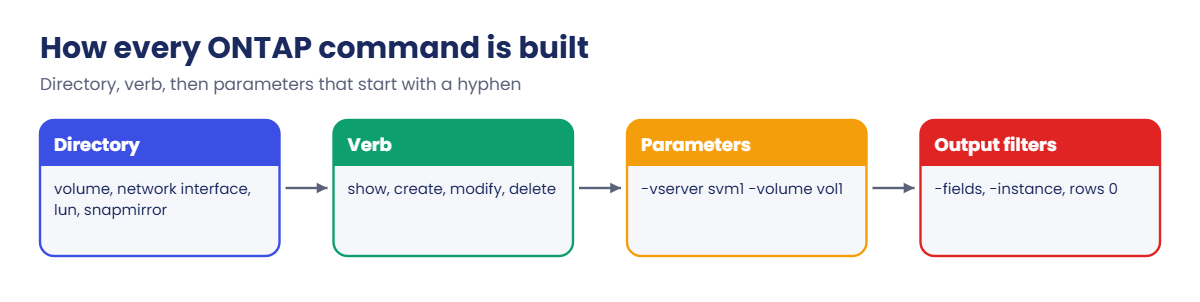
You reach the clustershell with SSH to the cluster management IP, for example ssh admin@192.168.56.100. The prompt shows the cluster name, like saat-cluster::>. Commands are grouped in a tree: a directory such as volume or network interface, then a verb such as show, create, modify or delete, then parameters that start with a hyphen.
You don’t have to type it all. Any unique short form works (vol sh runs volume show), the Tab key completes, and ? lists what can come next.
| Command | What it does | Example | Type |
|---|---|---|---|
? |
Lists the commands or parameters that can come next. | volume ? |
Read only |
-fields |
Shows only the columns you name, one row per object. | volume show -fields size,used,percent-used |
Read only |
-instance |
Shows every field of each object, one block per object. | volume show -vserver svm1 -volume vol1 -instance |
Read only |
set -privilege |
Changes the privilege level. Some commands exist only in advanced or diag mode. | set -privilege advanced |
Changes config |
rows |
Sets how many rows print before the output pauses. 0 means no paging. | rows 0 |
Changes config |
history / redo |
Lists the commands you ran in this session, and runs one again by number. | redo 5 |
Changes config |
man |
Shows the manual page for a command. | man volume create |
Read only |
system node run |
Runs a nodeshell command on one node (the old per-node shell). | system node run -node saat-cluster-01 -command "sysstat -x 1" |
Read only |
Cluster and nodes
| Command | What it does | Example | Type |
|---|---|---|---|
version |
The ONTAP release running on the cluster. | version |
Read only |
cluster show |
Every node with Health and Eligibility. Both should be true. | cluster show |
Read only |
cluster identity show |
Cluster name, UUID, serial number and location. | cluster identity show |
Read only |
system node show |
Nodes with uptime, model and health. | system node show -fields model,serialnumber,uptime |
Read only |
system health status show |
Overall system health (ok or degraded). | system health status show |
Read only |
system health alert show |
The alerts behind a degraded status, with corrective actions. | system health alert show |
Read only |
cluster date show |
Date, time and time zone on each node. | cluster date show |
Read only |
cluster time-service ntp server create |
Adds an NTP server. | cluster time-service ntp server create -server 192.168.56.10 |
Changes config |
system node reboot |
Reboots one node. Its partner takes over first if HA is healthy. | system node reboot -node saat-cluster-01 -reason "patching" |
Danger |
High availability: takeover and giveback
| Command | What it does | Example | Type |
|---|---|---|---|
storage failover show |
Each node, its partner, and whether takeover is possible. | storage failover show |
Read only |
storage failover show-takeover |
Progress of a running takeover. | storage failover show-takeover |
Read only |
storage failover takeover |
Planned takeover: the partner serves this node’s storage. | storage failover takeover -ofnode saat-cluster-01 |
Danger |
storage failover giveback |
Gives the aggregates back to the node when it is ready. | storage failover giveback -ofnode saat-cluster-01 |
Danger |
storage failover show-giveback |
Giveback status per aggregate, including vetoes. | storage failover show-giveback |
Read only |
storage failover modify -auto-giveback |
Turns automatic giveback on or off. | storage failover modify -node saat-cluster-01 -auto-giveback true |
Changes config |
Disks, shelves and aggregates (local tiers)
| Command | What it does | Example | Type |
|---|---|---|---|
storage shelf show |
Shelves, their modules and state. | storage shelf show |
Read only |
storage disk show |
All disks with owner, type, size and container. | storage disk show |
Read only |
storage disk show -container-type |
Only spare, broken or unassigned disks. | storage disk show -container-type broken |
Read only |
storage disk assign |
Gives an unowned disk to a node. | storage disk assign -disk 1.0.22 -owner saat-cluster-01 |
Changes config |
storage aggregate show-spare-disks |
Spares per node, by type and size. | storage aggregate show-spare-disks -original-owner saat-cluster-01 |
Read only |
storage aggregate create |
Builds an aggregate from spares. Add -simulate true to see the layout first. | storage aggregate create -aggregate aggr1_01 -node saat-cluster-01 -diskcount 8 -disktype SAS -raidtype raid_dp |
Changes config |
storage aggregate add-disks |
Grows an aggregate. Disks can’t be removed again. | storage aggregate add-disks -aggregate aggr1_01 -diskcount 4 |
Changes config |
storage aggregate show |
Aggregates with size, available space, used % and state. | storage aggregate show |
Read only |
storage aggregate show-status |
RAID groups and the role of every disk. | storage aggregate show-status -aggregate aggr1_01 |
Read only |
storage aggregate show-space |
Where the space in an aggregate goes. | storage aggregate show-space -aggregate-name aggr1_01 |
Read only |
Storage VMs (SVMs)
Older documents call an SVM a vserver, and the commands still use that word.
| Command | What it does | Example | Type |
|---|---|---|---|
vserver show |
Data SVMs with their state and root volume. | vserver show |
Read only |
vserver create |
Creates an SVM and its root volume. | vserver create -vserver svm1 -aggregate aggr1_01 -rootvolume-security-style unix |
Changes config |
vserver modify |
Changes allowed protocols or the aggregate list. | vserver modify -vserver svm1 -allowed-protocols nfs,cifs,iscsi -aggr-list aggr1_01,aggr1_02 |
Changes config |
vserver stop / start |
Stops or starts all data access for an SVM. | vserver stop -vserver svm1 |
Danger |
vserver services name-service dns create |
DNS servers for an SVM. | vserver services name-service dns create -vserver svm1 -domains saatvedha.lab -name-servers 192.168.56.10 |
Changes config |
Network: ports, LIFs and routes
| Command | What it does | Example | Type |
|---|---|---|---|
network port show |
Physical and virtual ports with link, MTU, speed and broadcast domain. | network port show -node saat-cluster-01 |
Read only |
network port ifgrp create |
Creates an interface group (LACP or static). | network port ifgrp create -node saat-cluster-01 -ifgrp a0a -distr-func port -mode multimode_lacp |
Changes config |
network port ifgrp add-port |
Adds a member port to an interface group. | network port ifgrp add-port -node saat-cluster-01 -ifgrp a0a -port e0c |
Changes config |
network port vlan create |
Creates a tagged VLAN port. | network port vlan create -node saat-cluster-01 -vlan-name a0a-20 |
Changes config |
network port broadcast-domain show |
Broadcast domains and their ports. | network port broadcast-domain show |
Read only |
network subnet create |
A pool of IP addresses for new LIFs. | network subnet create -subnet-name sn_data -broadcast-domain Default -subnet 192.168.56.0/24 -gateway 192.168.56.1 -ip-ranges 192.168.56.160-192.168.56.169 |
Changes config |
network interface show |
LIFs with status, address, current node and port, and Is Home. | network interface show -vserver svm1 |
Read only |
network interface show -is-home false |
LIFs that are away from their home port. | network interface show -is-home false |
Read only |
network interface create |
Creates a LIF with a service policy. | network interface create -vserver svm1 -lif svm1_nas1 -service-policy default-data-files -home-node saat-cluster-01 -home-port e0c -address 192.168.56.130 -netmask 255.255.255.0 |
Changes config |
network interface migrate |
Moves a NAS LIF to another port now. | network interface migrate -vserver svm1 -lif svm1_nas1 -destination-node saat-cluster-02 -destination-port e0c |
Changes config |
network interface revert |
Sends a LIF back to its home port. | network interface revert -vserver svm1 -lif svm1_nas1 |
Changes config |
network interface show -failover |
Failover policy, group and target ports. | network interface show -vserver svm1 -failover |
Read only |
network route create |
A route for an SVM. | network route create -vserver svm1 -destination 0.0.0.0/0 -gateway 192.168.56.1 |
Changes config |
network ping |
Pings from a LIF, so you test the same path clients use. | network ping -vserver svm1 -lif svm1_nas1 -destination 192.168.56.21 |
Read only |
network connections active show |
Client connections per LIF and protocol. | network connections active show -vserver svm1 |
Read only |
FlexVol volumes and qtrees
| Command | What it does | Example | Type |
|---|---|---|---|
volume show |
Volumes with size, available space and used %. | volume show -vserver svm1 |
Read only |
volume create |
Creates a volume and mounts it in the namespace. | volume create -vserver svm1 -volume vol1 -aggregate aggr1_01 -size 100g -junction-path /vol1 |
Changes config |
volume modify -size |
Grows a volume (+50g adds 50 GB). | volume modify -vserver svm1 -volume vol1 -size +50g |
Changes config |
volume modify -autosize-mode |
Lets a volume grow by itself up to a limit. | volume modify -vserver svm1 -volume vol1 -autosize-mode grow -max-autosize 200g |
Changes config |
volume show-space |
Where the space inside a volume goes. | volume show-space -vserver svm1 -volume vol1 |
Read only |
volume move start |
Moves a volume to another aggregate while clients keep working. | volume move start -vserver svm1 -volume vol1 -destination-aggregate aggr1_02 |
Changes config |
volume move show |
Phase and progress of volume moves. | volume move show |
Read only |
volume mount / unmount |
Adds or removes a volume’s junction path. Unmounting cuts NAS clients off. | volume unmount -vserver svm1 -volume vol1 |
Danger |
volume offline / delete |
Takes a volume offline, then deletes it. | volume offline -vserver svm1 -volume vol1 |
Danger |
volume qtree create |
A folder ONTAP can limit with quotas. | volume qtree create -vserver svm1 -volume vol1 -qtree projects |
Changes config |
volume quota report |
Space used against each quota. | volume quota report -vserver svm1 -volume vol1 |
Read only |
SAN: LUNs, igroups, iSCSI, FC and NVMe
| Command | What it does | Example | Type |
|---|---|---|---|
vserver iscsi create |
Starts the iSCSI target in an SVM. | vserver iscsi create -vserver svm1 |
Changes config |
vserver iscsi session show |
iSCSI sessions from hosts. | vserver iscsi session show -vserver svm1 |
Read only |
vserver fcp initiator show |
FC host WWPNs logged in to the SVM. | vserver fcp initiator show -vserver svm1 |
Read only |
lun create |
Creates a LUN inside a volume. | lun create -vserver svm1 -path /vol/vol_db/lun1 -size 100g -ostype linux -space-reserve disabled |
Changes config |
lun show |
LUNs with state, mapped status and size. | lun show -vserver svm1 |
Read only |
lun igroup create |
An initiator group with the host IQN or WWPNs. | lun igroup create -vserver svm1 -igroup ig_db01 -protocol iscsi -ostype linux -initiator iqn.1994-05.com.redhat:db01 |
Changes config |
lun igroup add |
Adds another initiator to an igroup. | lun igroup add -vserver svm1 -igroup ig_db01 -initiator iqn.1994-05.com.redhat:db02 |
Changes config |
lun igroup show -instance |
Each initiator with logged in or not logged in. | lun igroup show -vserver svm1 -igroup ig_db01 -instance |
Read only |
lun mapping create |
Presents a LUN to an igroup with a LUN ID. | lun mapping create -vserver svm1 -path /vol/vol_db/lun1 -igroup ig_db01 |
Changes config |
lun mapping show |
Which igroups see which LUNs, and the reporting nodes. | lun mapping show -vserver svm1 -fields igroup,lun-id,reporting-nodes |
Read only |
lun mapping add-reporting-nodes |
Adds paths through another HA pair (before a volume move). | lun mapping add-reporting-nodes -vserver svm1 -path /vol/vol_db/lun1 -igroup ig_db01 -destination-aggregate aggr1_03 |
Changes config |
lun resize |
Grows a LUN. The host must rescan afterwards. | lun resize -vserver svm1 -path /vol/vol_db/lun1 -size 150g |
Changes config |
lun mapping delete |
Removes a LUN from a host at once. | lun mapping delete -vserver svm1 -path /vol/vol_db/lun1 -igroup ig_db01 |
Danger |
vserver nvme subsystem create |
An NVMe subsystem (the NVMe version of an igroup). | vserver nvme subsystem create -vserver svm1 -subsystem ss_db01 -ostype linux |
Changes config |
vserver nvme subsystem host add |
Adds a host NQN to a subsystem. | vserver nvme subsystem host add -vserver svm1 -subsystem ss_db01 -host-nqn nqn.2014-08.org.nvmexpress:uuid:db01 |
Changes config |
vserver nvme subsystem map add |
Maps a namespace to a subsystem. | vserver nvme subsystem map add -vserver svm1 -subsystem ss_db01 -path /vol/vol_nvme/ns1 |
Changes config |
NAS: NFS exports and SMB shares
| Command | What it does | Example | Type |
|---|---|---|---|
vserver nfs create |
Turns on NFS and chooses the versions. | vserver nfs create -vserver svm1 -v3 enabled -v4.1 enabled |
Changes config |
vserver export-policy create |
A new export policy. | vserver export-policy create -vserver svm1 -policyname linux_hosts |
Changes config |
vserver export-policy rule create |
Who may mount, and with what access. | vserver export-policy rule create -vserver svm1 -policyname linux_hosts -clientmatch 192.168.56.0/24 -rorule sys -rwrule sys -superuser none |
Changes config |
vserver export-policy rule show |
Rules in index order. The first match wins. | vserver export-policy rule show -vserver svm1 -policyname linux_hosts |
Read only |
vserver export-policy check-access |
Tests what access a client IP will get, path by path. | vserver export-policy check-access -vserver svm1 -volume vol1 -client-ip 192.168.56.21 -authentication-method sys -protocol nfs3 -access-type read-write |
Read only |
volume modify -policy |
Attaches an export policy to a volume. | volume modify -vserver svm1 -volume vol1 -policy linux_hosts |
Changes config |
vserver cifs create |
Creates the SMB server and joins Active Directory. | vserver cifs create -vserver svm1 -cifs-server SVM1-CIFS -domain saatvedha.lab |
Changes config |
vserver cifs share create |
Creates a share on a junction path. | vserver cifs share create -vserver svm1 -share-name finance -path /finance |
Changes config |
vserver cifs share access-control create |
Share permissions for a user or group. | vserver cifs share access-control create -vserver svm1 -share finance -user-or-group "SAATVEDHA\finance" -permission change |
Changes config |
vserver cifs session show |
Who is connected over SMB, from which address. | vserver cifs session show -vserver svm1 |
Read only |
vserver cifs check |
Domain controller connection status per node. | vserver cifs check -vserver svm1 |
Read only |
Storage efficiency
| Command | What it does | Example | Type |
|---|---|---|---|
volume efficiency on |
Turns on efficiency for a volume. | volume efficiency on -vserver svm1 -volume vol1 |
Changes config |
volume efficiency show |
State, schedule and progress of efficiency jobs. | volume efficiency show -vserver svm1 |
Read only |
volume efficiency start -scan-old-data |
Processes data that was written before efficiency was on. | volume efficiency start -vserver svm1 -volume vol1 -scan-old-data true |
Changes config |
volume show -fields sis-space-saved |
Space saved by dedupe and compression. | volume show -vserver svm1 -fields sis-space-saved,sis-space-saved-percent |
Read only |
Snapshots and FlexClone
| Command | What it does | Example | Type |
|---|---|---|---|
volume snapshot create |
Takes a snapshot now. | volume snapshot create -vserver svm1 -volume vol1 -snapshot before_patch |
Changes config |
volume snapshot show |
Snapshots with their creation time and size. | volume snapshot show -vserver svm1 -volume vol1 |
Read only |
volume snapshot restore-file |
Brings back one file from a snapshot. | volume snapshot restore-file -vserver svm1 -volume vol1 -snapshot before_patch -path /reports/q3.xlsx |
Changes config |
volume snapshot restore |
Rolls the whole volume back. Newer data and snapshots are lost. | volume snapshot restore -vserver svm1 -volume vol1 -snapshot before_patch |
Danger |
volume snapshot delete |
Deletes a snapshot and frees its space. | volume snapshot delete -vserver svm1 -volume vol1 -snapshot before_patch |
Danger |
volume snapshot policy create |
A schedule with copies to keep and SnapMirror labels. | volume snapshot policy create -vserver svm1 -policy daily7 -enabled true -schedule1 daily -count1 7 -snapmirror-label1 daily |
Changes config |
volume clone create |
A writable copy of a volume in seconds. | volume clone create -vserver svm1 -flexclone vol1_test -parent-volume vol1 -junction-path /vol1_test |
Changes config |
volume clone split start |
Makes a clone a normal, independent volume. | volume clone split start -vserver svm1 -flexclone vol1_test |
Changes config |
Peering and SnapMirror
| Command | What it does | Example | Type |
|---|---|---|---|
cluster peer create |
Peers two clusters through their intercluster LIFs. | cluster peer create -address-family ipv4 -peer-addrs 192.168.57.140 |
Changes config |
cluster peer show |
Peer clusters with availability and authentication. | cluster peer show |
Read only |
vserver peer create / accept |
Peers two SVMs for SnapMirror. | vserver peer create -vserver svm1 -peer-vserver svm1dr -applications snapmirror -peer-cluster saat-dr |
Changes config |
snapmirror create |
Creates a relationship (run on the destination). | snapmirror create -source-path svm1:vol1 -destination-path svm1dr:vol1_dr -policy MirrorAllSnapshots -schedule hourly |
Changes config |
snapmirror initialize |
The first full transfer. | snapmirror initialize -destination-path svm1dr:vol1_dr |
Changes config |
snapmirror show |
State, status, health and lag of each relationship. | snapmirror show -fields state,status,healthy,lag-time |
Read only |
snapmirror update |
Sends the latest changes now. | snapmirror update -destination-path svm1dr:vol1_dr |
Changes config |
snapmirror quiesce / break |
Stops updates and makes the destination writable (DR failover). | snapmirror break -destination-path svm1dr:vol1_dr |
Danger |
snapmirror resync |
Puts a broken relationship back in sync. Newer destination data is lost. | snapmirror resync -destination-path svm1dr:vol1_dr |
Danger |
snapmirror policy create / add-rule |
A vault policy with labels and retention. | snapmirror policy add-rule -vserver svm1dr -policy vault_30d -snapmirror-label daily -keep 30 |
Changes config |
snapmirror list-destinations |
Run on the source: which mirrors use this volume. | snapmirror list-destinations -source-path svm1:vol1 |
Read only |
Performance, QoS and FabricPool
| Command | What it does | Example | Type |
|---|---|---|---|
qos statistics volume latency show |
Latency per volume, split by layer. | qos statistics volume latency show -iterations 5 |
Read only |
qos statistics volume performance show |
IOPS and throughput per volume. | qos statistics volume performance show -iterations 5 |
Read only |
statistics show-periodic |
Cluster-wide counters every few seconds. | statistics show-periodic |
Read only |
qos policy-group create |
A throughput ceiling (or floor). | qos policy-group create -policy-group pg_2k -vserver svm1 -max-throughput 2000iops |
Changes config |
volume modify -qos-policy-group |
Applies a QoS policy to a volume. | volume modify -vserver svm1 -volume vol1 -qos-policy-group pg_2k |
Changes config |
storage aggregate object-store config create |
Adds an S3 bucket as a cloud tier. | storage aggregate object-store config create -object-store-name s3tier1 -provider-type AWS_S3 -server s3.ap-south-1.amazonaws.com -container-name saat-fabricpool -access-key AKIAEXAMPLE |
Changes config |
storage aggregate object-store attach |
Makes an aggregate a FabricPool. It can’t be undone. | storage aggregate object-store attach -aggregate aggr1_01 -object-store-name s3tier1 |
Danger |
volume modify -tiering-policy |
Which cold blocks move to the cloud tier. | volume modify -vserver svm1 -volume vol1 -tiering-policy snapshot-only |
Changes config |
volume show-footprint |
How much of a volume sits in each tier. | volume show-footprint -vserver svm1 -volume vol1 |
Read only |
Monitoring, AutoSupport and users
| Command | What it does | Example | Type |
|---|---|---|---|
event log show |
The event log (EMS). Filter by severity or time. | event log show -severity <=ERROR |
Read only |
system node autosupport show |
AutoSupport state and transport per node. | system node autosupport show -node * -fields state,transport |
Read only |
system node autosupport invoke |
Sends an AutoSupport message now. | system node autosupport invoke -node * -type test -message "test" |
Changes config |
system node autosupport history show |
Whether recent messages were sent. | system node autosupport history show -node * |
Read only |
job show |
Background jobs and their state. | job show |
Read only |
security login create |
A login for a person or a group. | security login create -user-or-group-name ravi -application ssh -authentication-method password -role readonly |
Changes config |
security login show |
Who can log in, how, and with which role. | security login show |
Read only |
security audit log show |
Who ran which change commands. | security audit log show -fields timestamp,node,user,input |
Read only |
Three everyday recipes
1. Give Linux clients an NFS share
Turn on NFS, make a policy for the client subnet, create the volume with a junction path, and test access before anyone mounts.
vserver nfs create -vserver svm1 -v3 enabled -v4.1 enabled
vserver export-policy rule create -vserver svm1 -policyname default -clientmatch 192.168.56.0/24 -rorule sys -rwrule never -superuser none
vserver export-policy create -vserver svm1 -policyname linux_hosts
vserver export-policy rule create -vserver svm1 -policyname linux_hosts -clientmatch 192.168.56.0/24 -rorule sys -rwrule sys -superuser none
volume create -vserver svm1 -volume vol_app -aggregate aggr1_01 -size 100g -junction-path /vol_app -policy linux_hosts
vserver export-policy check-access -vserver svm1 -volume vol_app -client-ip 192.168.56.21 -authentication-method sys -protocol nfs3 -access-type read-write
On the client: mount -t nfs -o vers=4.1 192.168.56.130:/vol_app /mnt/app. The rule on the default policy lets clients read the SVM root, which they need to reach the junction.
2. A two-minute health check
cluster show
storage failover show
storage aggregate show
network interface show -is-home false
snapmirror show -fields state,healthy,lag-time
event log show -severity <=ERROR
Every node healthy, takeover possible on both partners, no aggregate near full, no LIF away from home, mirrors healthy with a normal lag, and no new errors. If anything looks wrong, start there.
3. Before you delete a volume
volume show -vserver svm1 -volume vol_old -fields junction-path,used,type
snapmirror list-destinations -source-path svm1:vol_old
network connections active show -vserver svm1
volume snapshot create -vserver svm1 -volume vol_old -snapshot final_before_delete
volume unmount -vserver svm1 -volume vol_old
volume offline -vserver svm1 -volume vol_old
volume delete -vserver svm1 -volume vol_old
Check what uses it, keep it offline for an agreed time if you can, and get the owner’s OK in writing. A deleted volume stays in the recovery queue for 12 hours by default, which is a safety net, not a plan.
Commands people look for that don’t exist
Many blogs still show 7-Mode commands. 7-Mode ended with Data ONTAP 8.2, so on a current cluster use the right-hand column.
| Old 7-Mode command | Use this in ONTAP 9 |
|---|---|
vol create, vol status |
volume create, volume show |
aggr status -r |
storage aggregate show-status |
exportfs |
vserver export-policy rule commands |
cifs shares |
vserver cifs share show |
snap list |
volume snapshot show |
sysconfig -a |
system node run -node NODE -command "sysconfig -a" (nodeshell), or system node show -instance |
cf status / cf takeover |
storage failover show / storage failover takeover |
lun show -m |
lun mapping show |
igroup create |
lun igroup create |
df -h |
volume show -fields size,used,available (or df in the nodeshell) |
Common questions
Is it vserver or SVM? Both mean the same thing. System Manager and the docs say SVM (storage VM); the CLI kept the older word, so commands use vserver and -vserver.
How do I see more than 10 columns of a table? Use -fields with the columns you want, or -instance for everything. rows 0 stops the output pausing.
Can I script these commands? Yes. Many teams run them over SSH from a jump host, but for real automation use the ONTAP REST API or Ansible’s netapp.ontap collection, which return structured data.
Where are the System Manager menu paths? Every task in the Command Builder ONTAP tab shows the GUI path next to the CLI commands.
Further reading: ONTAP CLI commands
NetApp’s official ONTAP command reference lists every command and parameter for each release, and the ONTAP 9 documentation explains the tasks behind them. To practise every command on this page step by step, take our NetApp ONTAP Storage Administration course.